Contents +
CTMON Google SEO Beginner's Guide: Business Website Diagnosis (Part 1)
Source: 创同盟
Date: 2025-08-08
Views: 2545
This article contains 1702 words and is estimated to take 5 minutes to read.
In 2025, with increasingly fierce competition in the traffic industry, Google's core search rules have long since evolved from "keywords + backlinks" to "user experience + semantic understanding".
In the systematic project of SEO, the technical SEO is the "blueprint and foundation of the building," determining the stability and accessibility of the website;
Content and keyword optimization: refers to "the meticulous design and functional layout of the building's interior," which influences whether visitors are willing to enter and stay.
The external links and brand authority (E-E-A-T) represent the building's geographical location and reputation, which determines how many people will come to visit and whether it is officially recognized by Google.
Only when the "blueprint, internal design, and geographical location" are all up to standard can this "building" stand firm—this is precisely the fundamental reason why a website needs to be diagnosed.
In the next two posts, I'll share key considerations for business website SEO diagnosis, teaching you how to quickly assess and fix potential problems. A quick 5-minute review will allow you to develop a business website remediation plan in just 30 minutes.

I. Core Experience | Core Web Vitals & HTTPS
Indicator meaning:
LCP (Maximum Content Rendering) : The time it takes for a visitor to see the main content on the first screen; ideally, it should be ≤ 2.5 seconds.
CLS (Cumulative Layout Offset) : Page element bounce range, ≤ 0.1.
INP (Interaction Delay) : The delay from the user's first interaction to the page response, ≤ 200 ms.
Recommended diagnostic tools:
- Click to check your website performance score now -
Example:
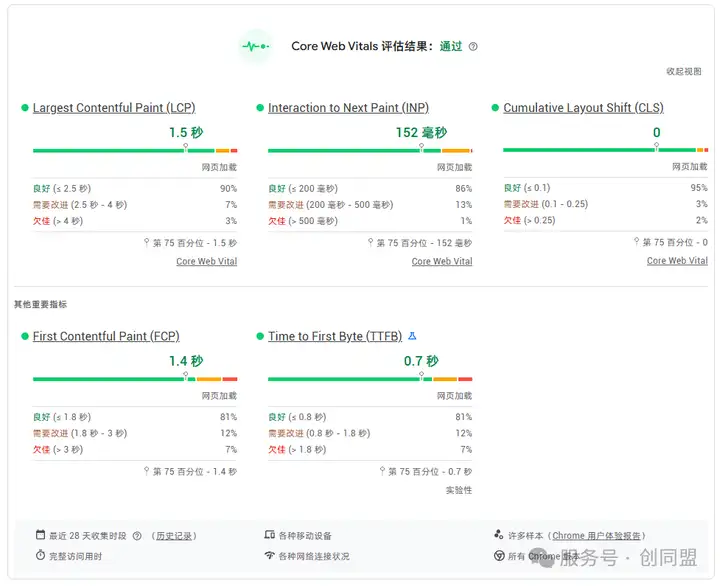
Diagnostic approach:
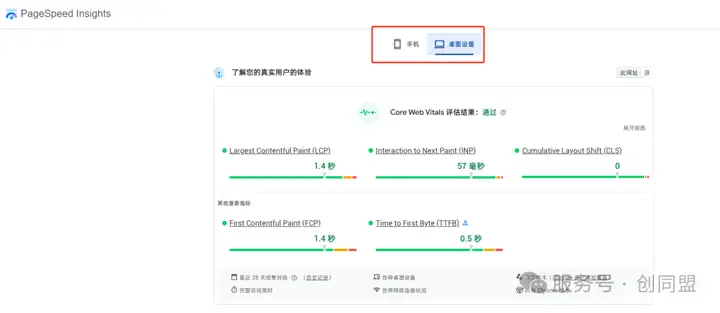
Open PageSpeedInsights (PSI) and view the analysis of mobile and desktop data separately to identify low-scoring pages.
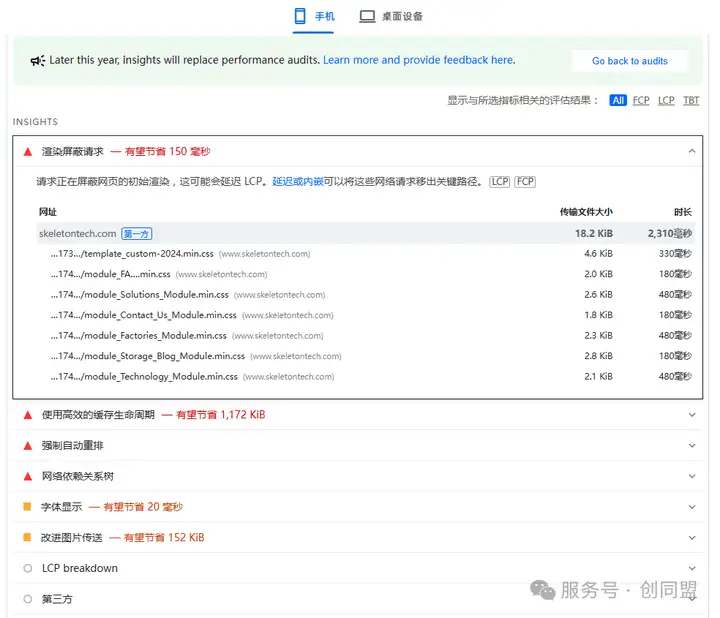
By combining Core Web Vitals reports, bottleneck resources can be identified, such as uncompressed images, blocking JavaScript, and third-party scripts.
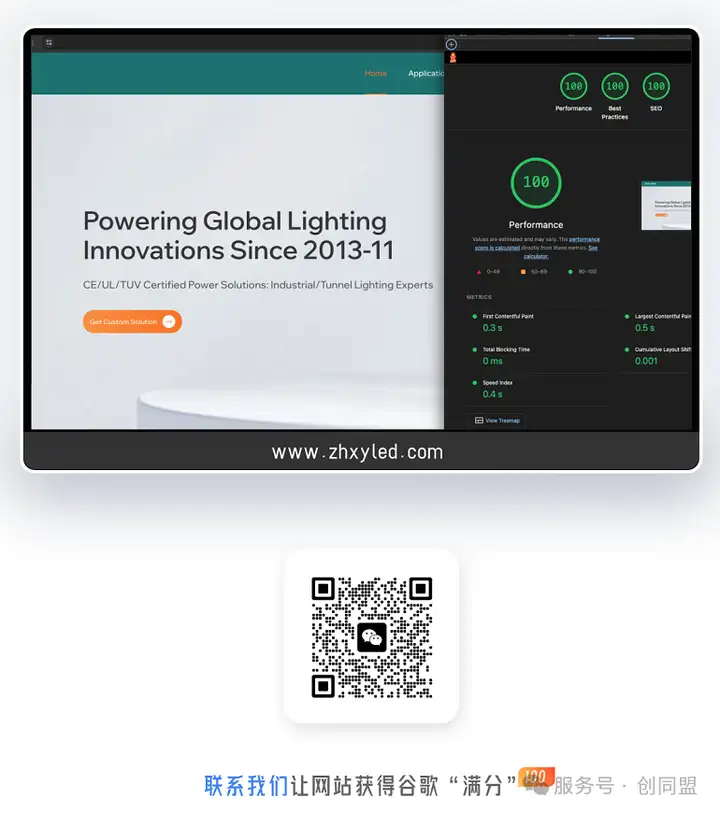
View rating:
II. Mobile-First | Schema Markup
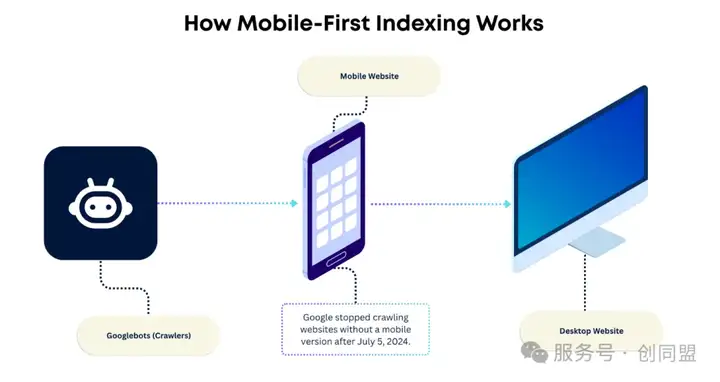
At the end of last year (2024), Google switched 100% to mobile indexing, meaning that Google's crawlers now primarily simulate smartphone users visiting our business website.
Therefore, the mobile version of a business website becomes the only final version that Google uses to understand, evaluate, and rank websites— this ranking result applies to both mobile and desktop searches.
For example:
Let's say our business website has a 1000-word article with 10 high-resolution images. However, to "save traffic and space for mobile users," the website only displays a 200-word summary and two smaller images when accessed via mobile.
Under the current rules, Google will only index and evaluate your page based on this 200-word summary and two images .
The extra 800 characters and 8 images that appear when you access the site on your computer are essentially non-existent to the Google search engine.
Any content differences between the desktop and mobile versions will be based on the mobile version.
Diagnostic approach
A. Check when accessing via mobile phone:
1. For the homepage, core landing pages, and blog pages, the font size should be ≥ 14 px, buttons ≥ 48 px, and ads should not obscure the content;
2. Check whether important text, articles, product descriptions, and key elements such as images, videos, and tables appear completely on the mobile device;
B. Website Development: Responsive Design automatically adjusts the layout based on the screen size of the accessing device. This approach fundamentally eliminates the problem of inconsistent content.
III. Structured Data | Schema Markup
According to reliable data, websites that occupy "rich media" display positions in Google search results (SERPs) can increase their click-through rate (CTR) by 20-30%.
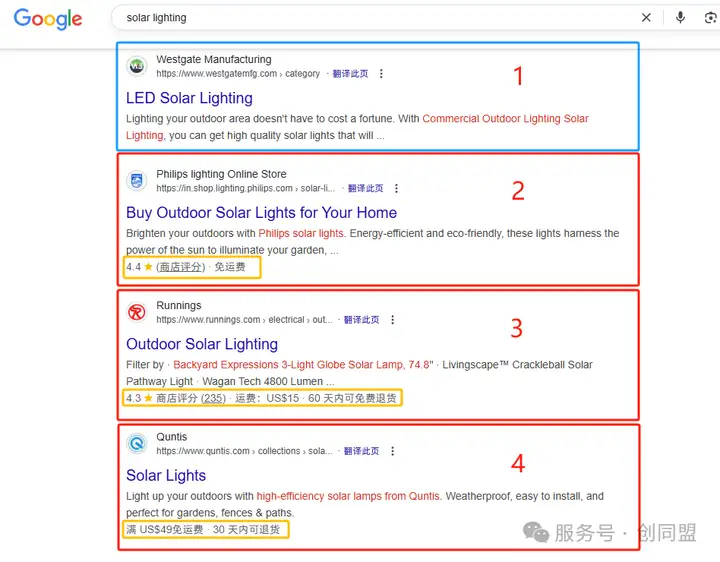
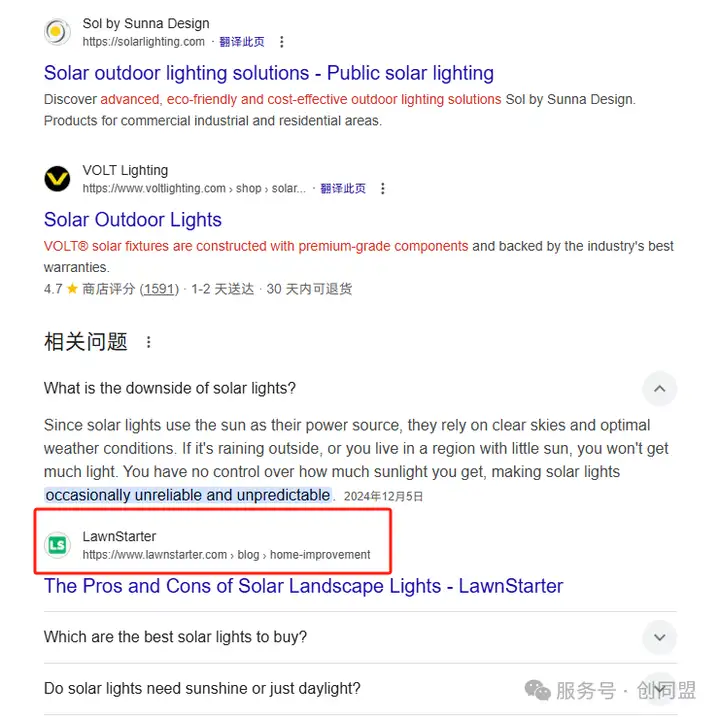
The yellow box in the image shows how structured data is used to generate "rich snippets" or "rich results" in Google search results.
At first glance, the website displays of companies that added screenshots 2, 3, and 4 are significantly larger than the website of company 1, which did not add structured data.
Not to mention, the added explanations of "ratings," "shipping costs," and "return policies" have a positive impact on click-through rates.
This is the main benefit of adding structured data for business website SEO; you should add it on both desktop and mobile.
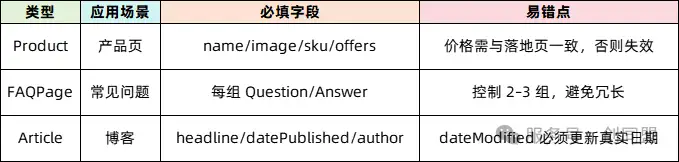
Later, I will introduce several common structured data tags and how to add them, so please stay tuned.
END
Due to space limitations, this issue of Business Website SEO Diagnosis will first share these three core factors affecting Google SEO performance:
- Is the "core experience" of the business website good?
- Does the business website make specific adjustments for mobile devices?
- Does the business website include appropriate structured data?
When we truly deliver on user experience, technical details, and content value, Google will naturally be happy to give you more traffic.
In the next installment, we'll continue sharing detailed diagnostics on business website SEO, including pages, content, language, and other aspects. Stay tuned!

What does international social media management service include? 2026 Guide to Social Media Management for Export Businesses
2026-10-28
How to write a WordPress product page that will make overseas buyers want to send inquiries?
2026-10-28

How to fix WordPress form emails not sending: Practical WP Mail SMTP configuration
2026-10-27
Are foreign trade promotion companies reliable? Six key criteria for businesses to judge promotion service providers in 2026.
2026-10-26
How do I set up an email account for export businesses? How can I configure it to avoid it ending up in the spam/junk mail folder?
2026-10-26
Related Articles
Are foreign trade promotion companies reliable? Six key criteria for businesses to judge promotion service providers in 2026.

The 140th Canton Fair Opens: How can export businesses seize overseas sourcing opportunities through digital marketing?

How to Choose an Overseas Promotion Company for Foreign Trade? 2026 Service Provider Selection Criteria and Evaluation Guide
How to avoid pitfalls when building a B2B export website? A guide to avoiding common mistakes in B2B export website development in 2026.
Which company should I choose for building a B2B export website? A comparison and recommendation of B2B export website service providers in 2026.

