Contents +
How to write a WordPress product page that will make overseas buyers want to send inquiries?
Source: 创同盟
Date: 2026-10-28
Views: 31
The product page is the most valuable page on an international trade website. Customers who search for a product on Google come to this page and see it first. They won't look at your homepage or the "About Us" section—they'll land directly on the product page and decide within three seconds whether to continue or close it.
This article is divided into two parts: first, it explains how to create a product page in the WordPress admin panel (technical operation), and then it explains how to write content that will make customers want to send inquiries (conversion techniques).

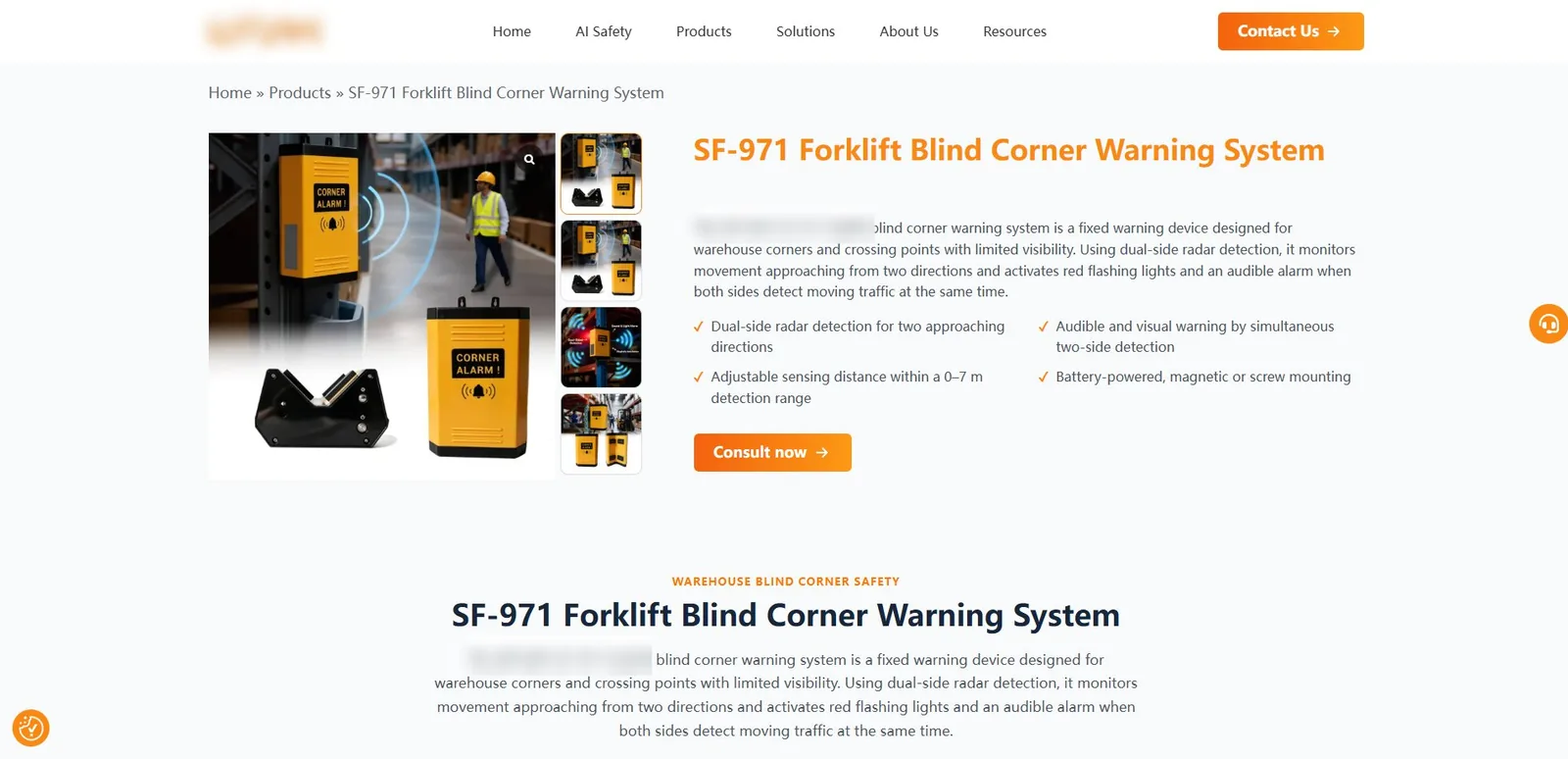
A standard export product page: image on the left, table on the right, and a prominent "inquiries" button at the bottom.
1. How to create a product page in WordPress
WordPress defaults to two content types: " for posts " and " for pages " . Which one should be used for product pages?
Product pages are built using " page " ), not " (article " ). Product pages are static and not sorted by time.
If you have many products, you can install a custom post type plugin (such as Custom Post Type UI) to create a dedicated category for " " products.
Simple approach: Use the " page and " page directly. Create subpages under the parent page, such as displaying various products under the Product Center.
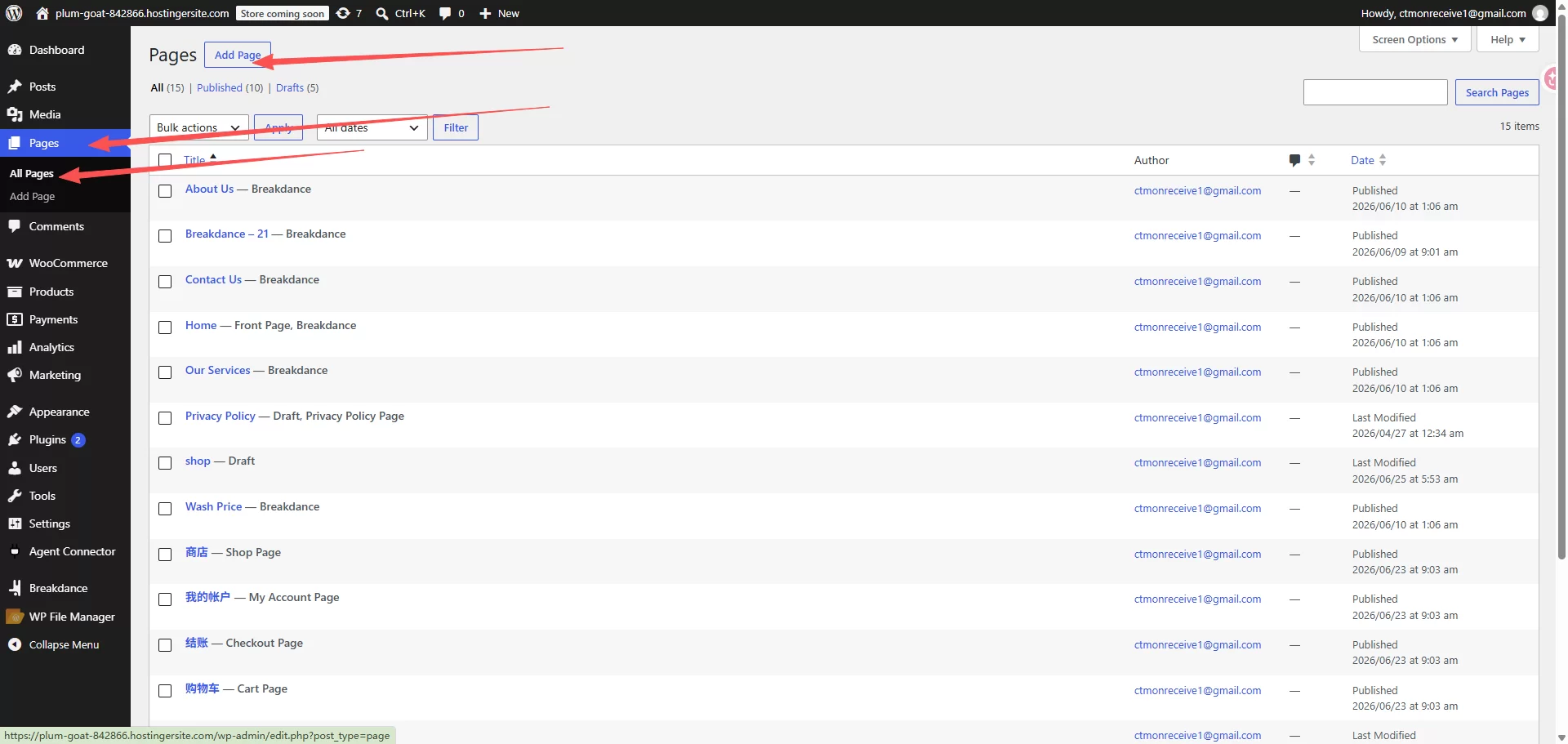
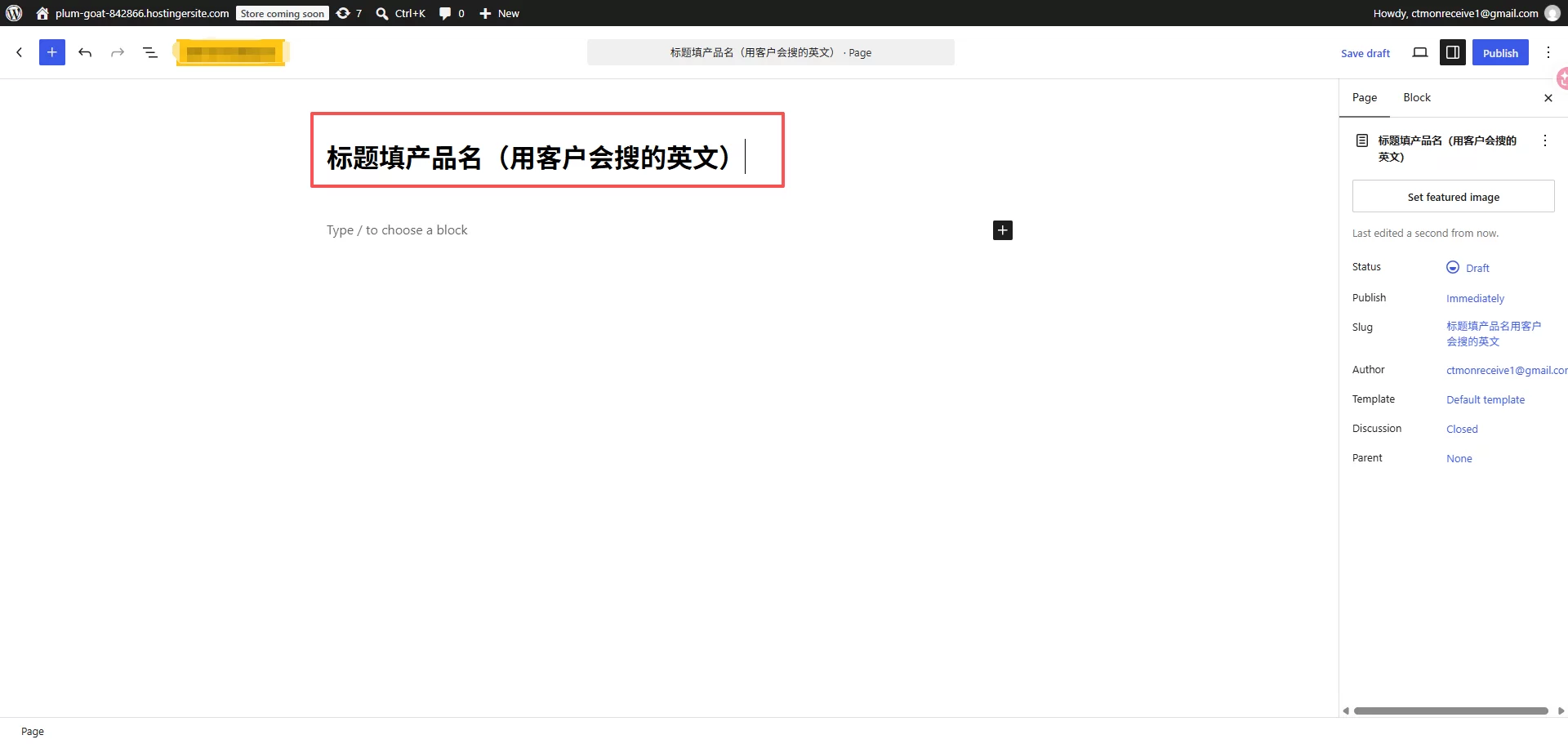
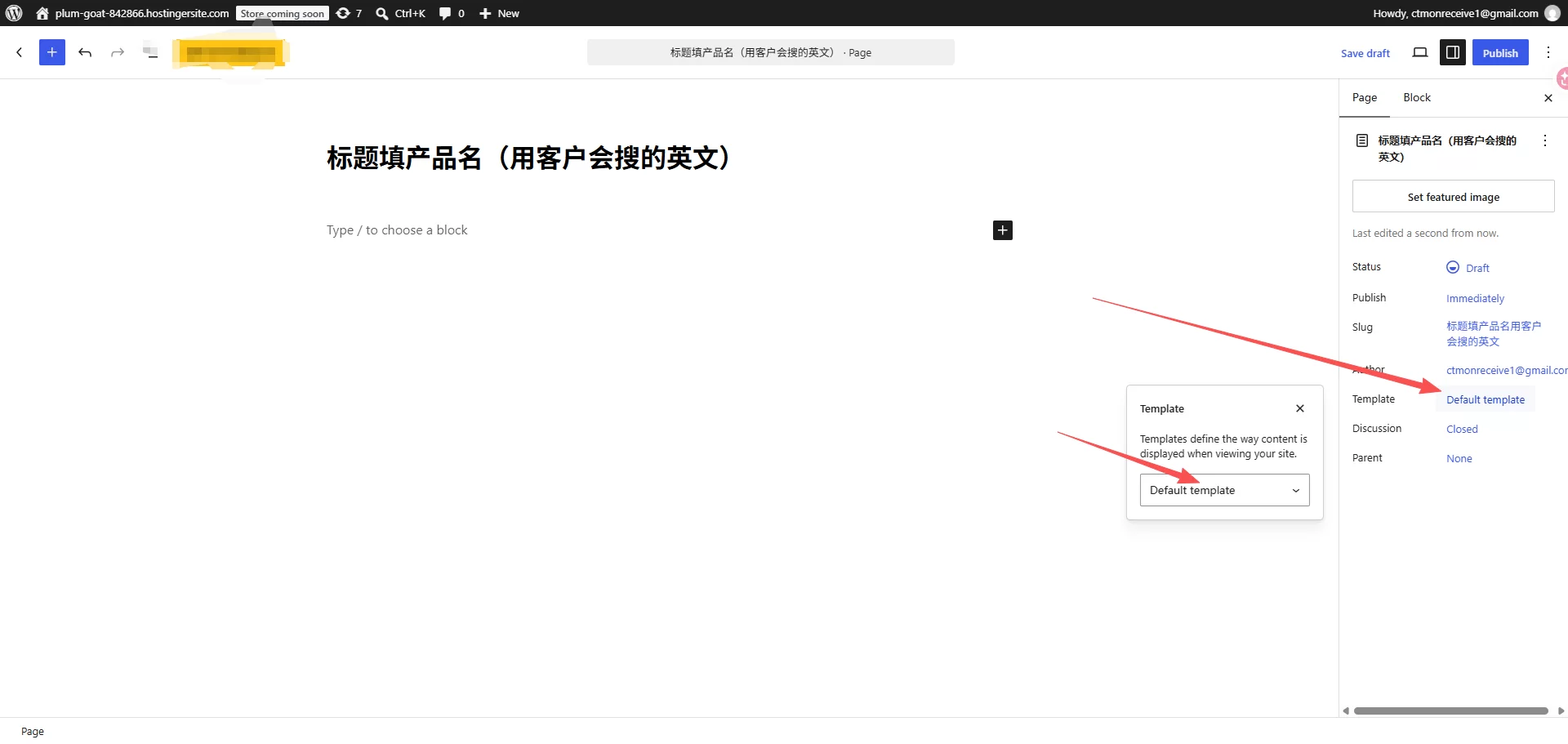
Steps to create a new product page:
Rank Math plugin
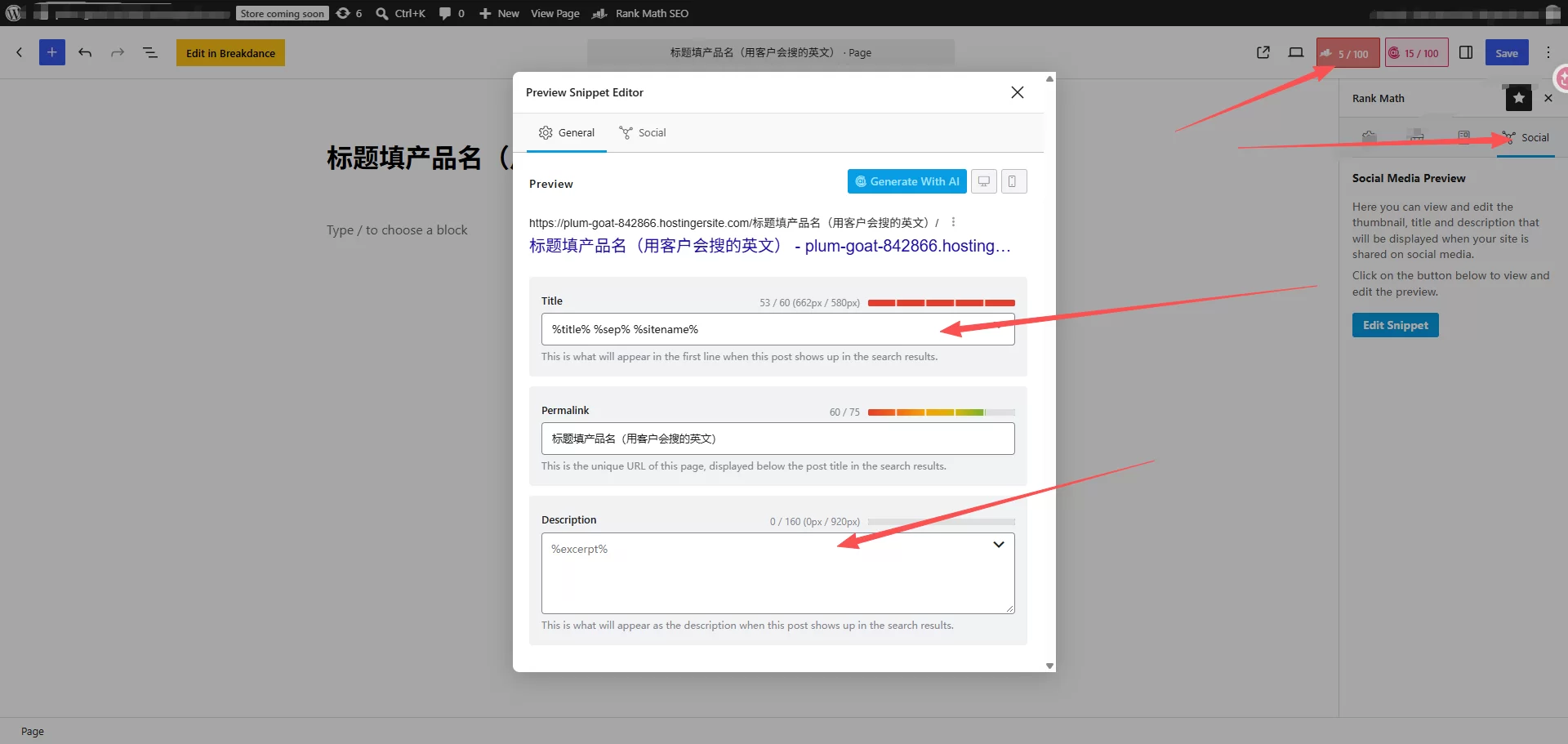
Drag Yoast upwards
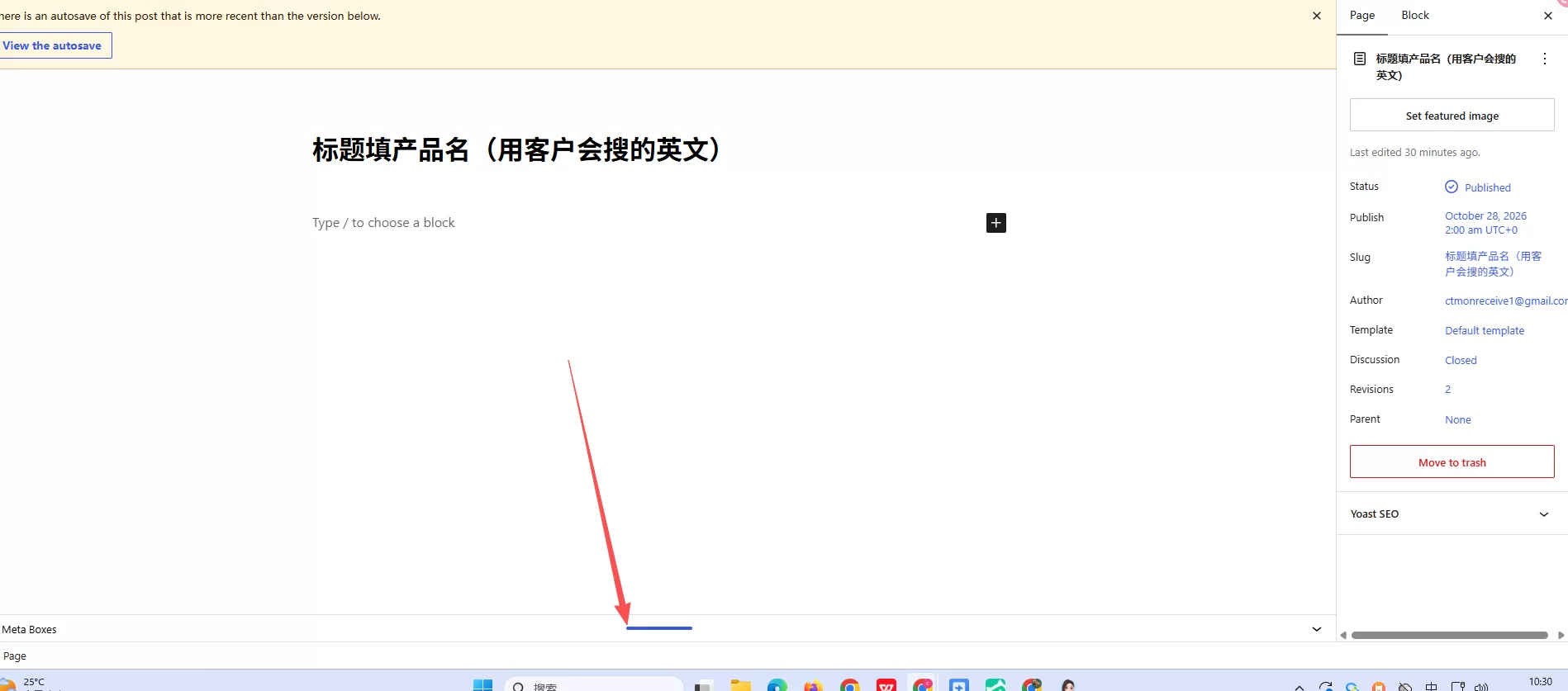
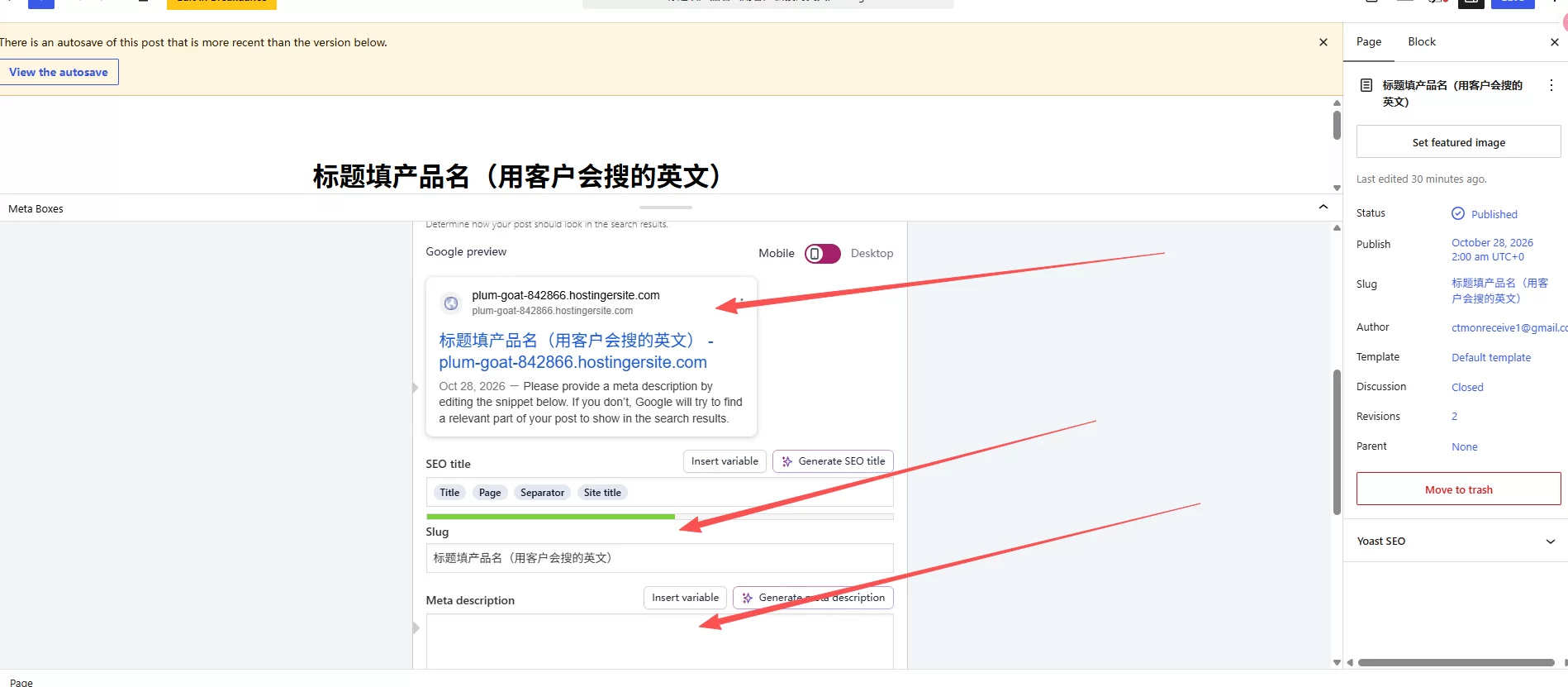
Backend left menu → Page → New Page
Fill in the product name in the title (using English terms that customers would use to search).
Select a template in the settings on the right (the default template is usually fine).
Fill in the content, images, and parameter table.
Use SEO plugins (Yoast/Rank Math) to set meta titles and descriptions
release
How to upload product images:
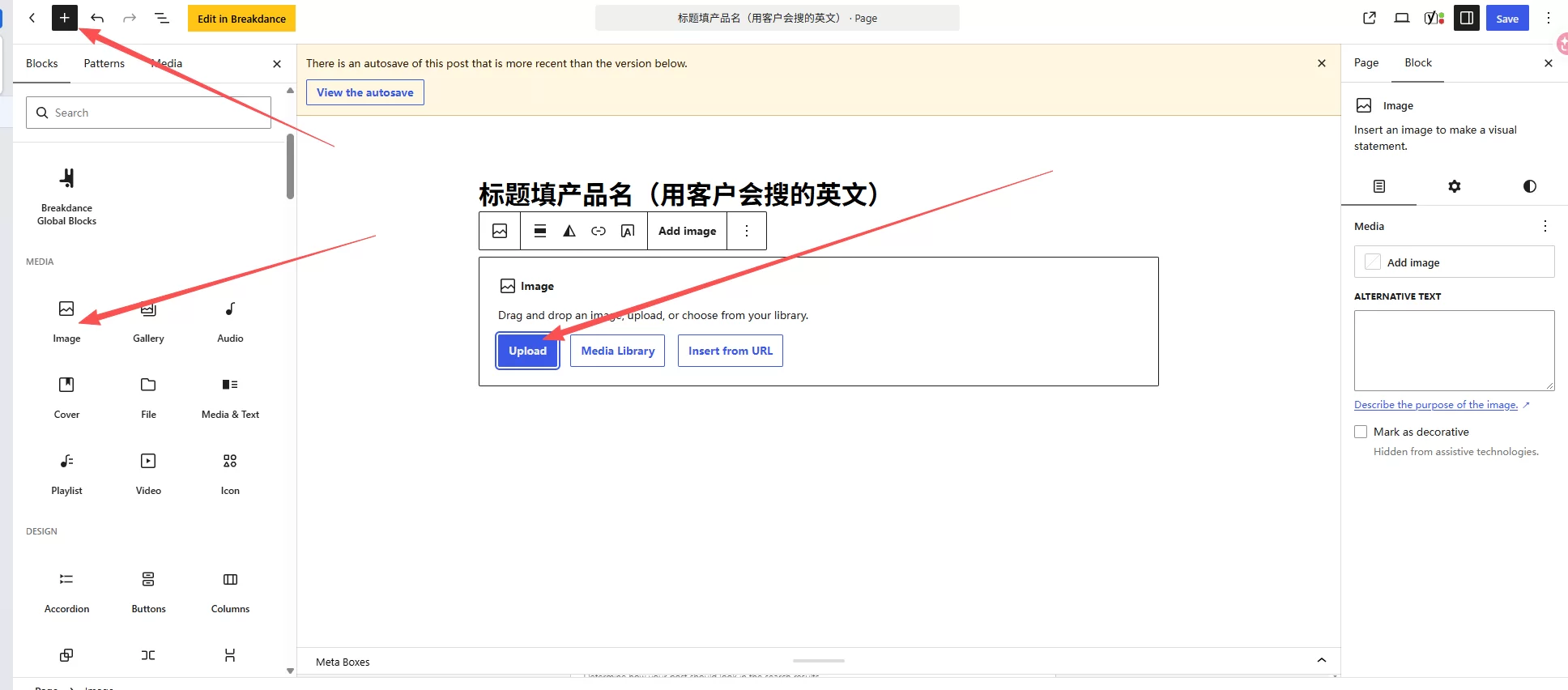
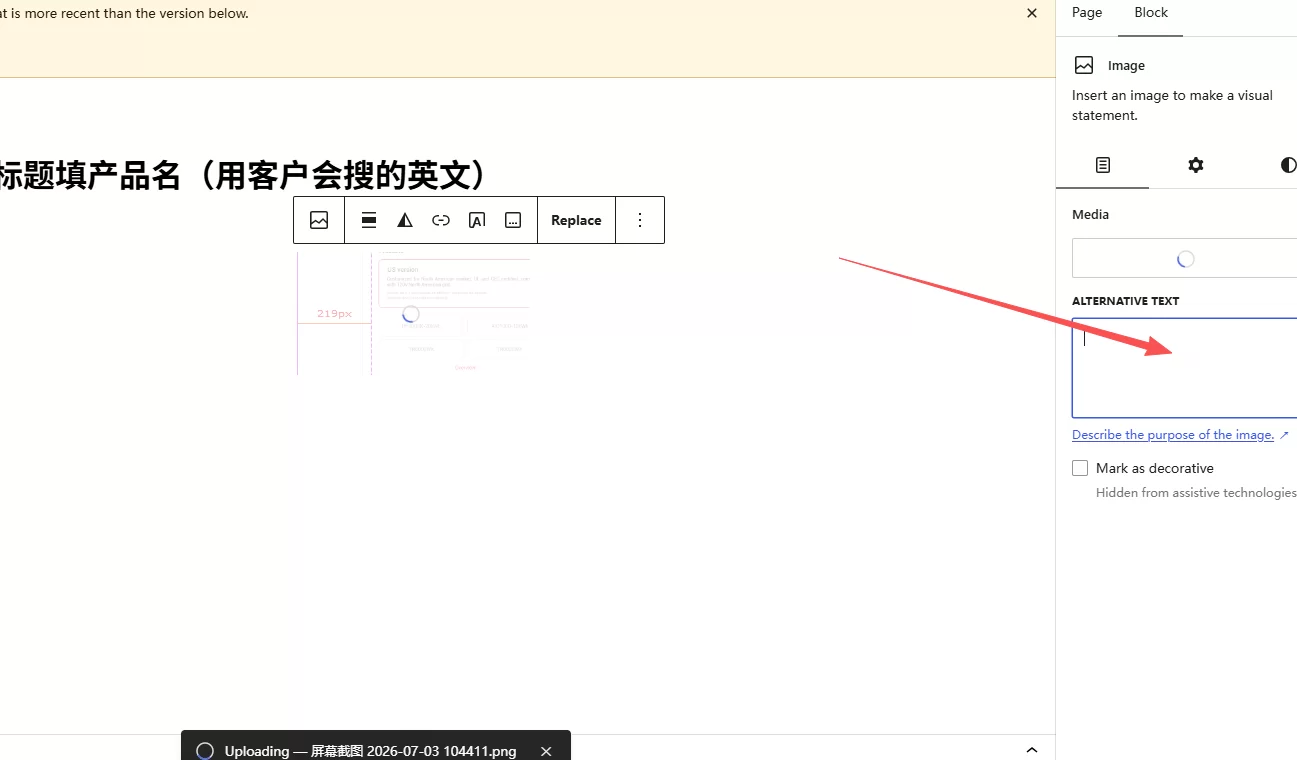
In the editor, click " to add media " , and upload your prepared product image.
Fill in the alternative text (alt tag) for each image; this is for image SEO.
The main image is placed at the top of the text, and detail images are placed next to the description.
Don't upload overly large images—if an original image is 5MB, the website will load slowly.
How to create a parameter table:
There are two methods. The simple method is to directly insert the " table " block into the Gutenberger editor, and manually fill in the material, dimensions, tolerances, and MOQ without installing any plugins.
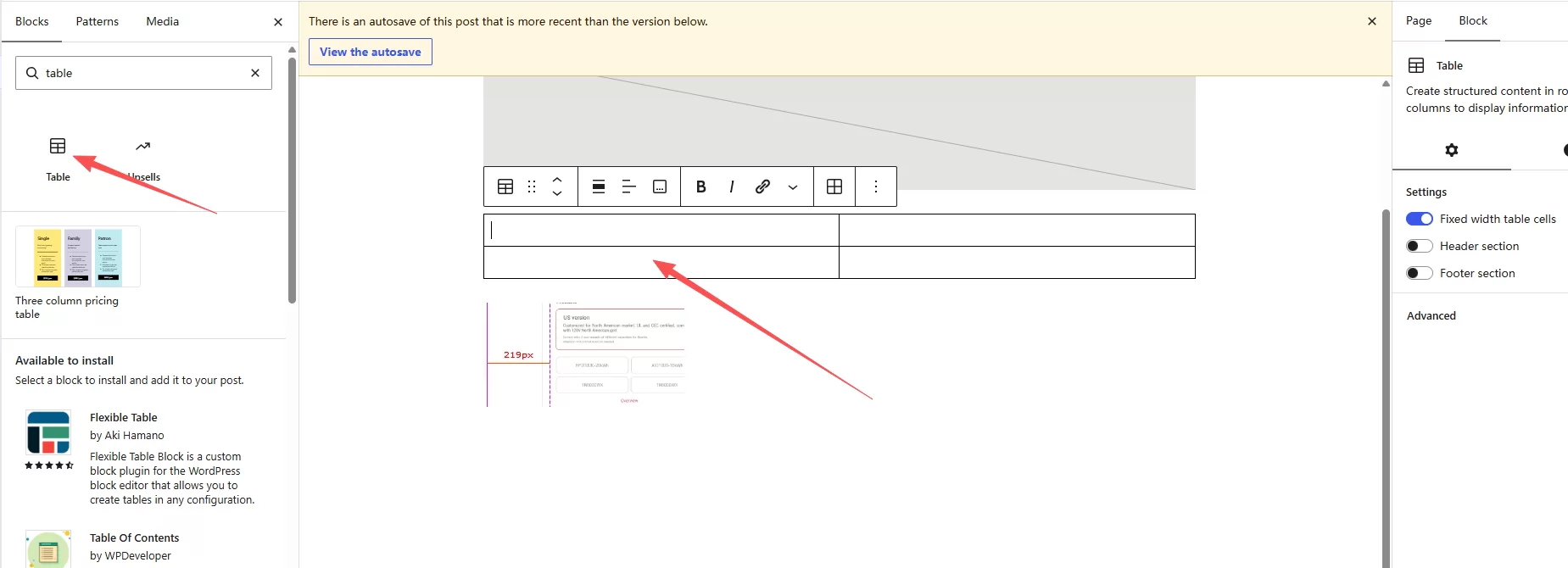
For a more visually appealing parameter table, you can install a plugin (such as TablePress) to create neat and attractive tables.
Don't use screenshots as parameter tables—Google can't read text in screenshots, and customers can't copy it.
II. Title: Don't use the product name, use the keywords customers search for.
Many product page titles simply say " Stainless Steel Bracket," " ," or in English, " Stainless Steel Bracket," " ." This is incorrect—what you write is not important; what customers search for is.
Formula: Core product keywords + Application scenarios + Your identity
Counterexample: Stainless Steel Bracket
Positive example: Stainless Steel Wall Mount Bracket for Outdoor LED Lighting | XX Factory
Why write it this way? Because customers won't search for " bracket " ," they'll search for " outdoor LED mounting bracket " ." If your title contains these keywords, Google will rank your page in its search results.
In the WordPress admin panel, enter the title in the input box at the very top of the page. The SEO plugin will then prompt you to enter " SEO title " below—this is the title displayed in Google search results and is more important than the page title.
III. Product Description: Don't just boast about the quality of " " ; provide specific parameters.
Buyers look at product pages not to see you boasting. They need to confirm a few things: whether your product is usable, what specifications it has, what the MOQ is, how long the delivery time is, and whether you can do customization for them.
The product description should include the following specific information:
What scenarios is this product used for? " is suitable for outdoor LED lighting installation, with a load-bearing capacity of XX kg "
Material and Specifications – " SUS304 stainless steel, dimensions XXxXXxXXmm "
Manufacturing Process and Tolerances – " CNC machining, tolerance ±0.1mm, surface brushed finish "
MOQ and Delivery Time – " MOQ 500pcs, standard specifications delivery time 15-20 days "
Certifications – " CE/RoHS certification, third-party test reports available "
The more specific this information is, the more the buyer will believe you are a genuine factory. Writing " Good quality, excellent price" or " is useless; only writing " : Tolerance ±0.1mm" " is useful—because only someone who actually manufactures this product knows the exact tolerance.
In the WordPress editor, the description should be written in the body text area. Don't start by piling on a parameter list; first, clearly explain in one paragraph what the product does and what problem it solves, and then add the parameter list.
IV. Product Images: Avoid using rendered images; use real photos.
Product images are the most important part of a product page. Buyers spend more time looking at images than reading text.
A complete product page should include at least these types of images:
Main image: A clean and clear product image with a white background, occupying the most prominent position on the page.
Detailed images: 2-3 close-up shots showcasing the details of the welds, surface treatment, and joints.
Application images: Photos of the product installed in real-world scenarios, allowing customers to imagine how they will use it.
Dimensional drawing: An engineering drawing with dimensions marked, allowing customers to confirm specifications without asking you.
The dumbest thing I've ever seen: using a 3D rendering as the main product image. The rendering looks beautiful, but buyers are very discerning—they can tell at a glance it's computer-generated and not a real product. Even a slightly less-than-ideal lighting in a real photo is more believable than a rendering.
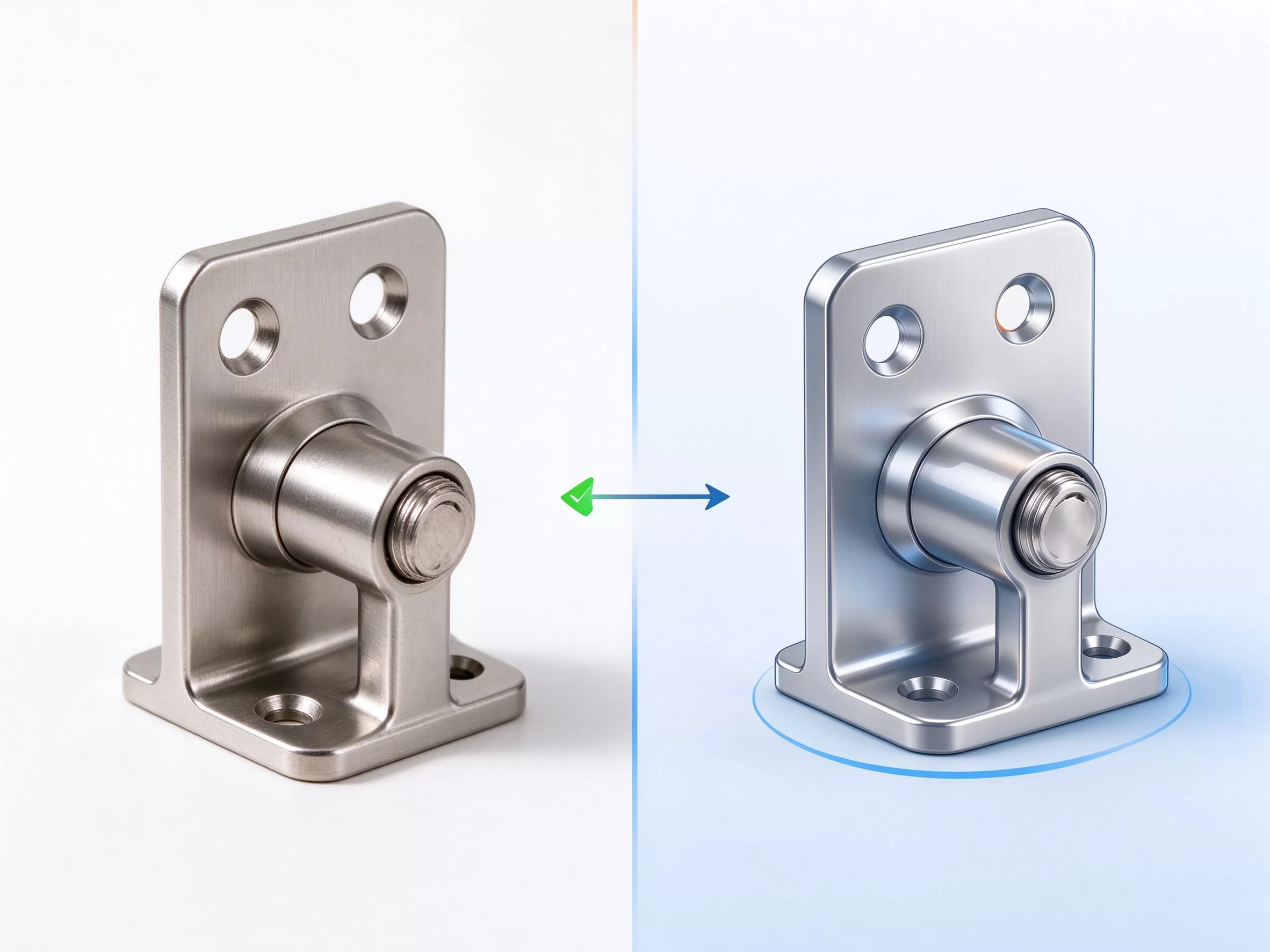
Left: Real product photo (credible) Right: 3D rendering (buyers can tell the difference at a glance)
After uploading an image in WordPress, remember to fill in the image description in the " alternative text " on the right—this alt tag is for Google and is also part of image SEO.
V. Trust Elements: Encouraging Customers to Send Inquiries
After reviewing the product information, buyers still have several concerns: Are you a genuine factory? Do you have export experience? Who should I contact if there are any problems? They won't send inquiries until these concerns are addressed.
Add these trust elements to the bottom of the product page:
Certification icons: CE, RoHS, ISO certification marks, with thumbnails of actual certificates.
Markets served: " exported to Germany, USA, Australia, Japan. "
Small factory photos: A corner of the workshop or a photo of the production line. Larger photos aren't necessary; small photos give customers the impression that you have a physical factory.
Reply Commitment: " We reply within 24 hours on business days. "
In WordPress, this content can be made into a reusable module (block), which can be added to the bottom of each product page without having to rewrite it each time.
6. CTA: Clearly tell the client what to do next.
After viewing many product pages, customers often don't know what to do next. You need to clearly tell them: Click this button to send inquiries.
Each product page must include:
A clearly visible inquiry button— " Inquire Now, " or " Get a Quote, " —should have a color that contrasts with the background.
Below the button is a short line of text: " Need custom size? Send us your drawing for a free quote "
Related Product Recommendations – " You may also like " . We recommend 3-5 related products to increase browsing depth.
In WordPress, you can create an inquiry button using the Gutenberger Editor's " button " block, or insert a short inquiry form using a form plugin (WPForms, Contact Form 7). Don't leave customers scrolling to the bottom of the page wondering how to " " .
VII. A real case I revised
Last year, a customer who manufactured hardware brackets contacted me, saying his WordPress product pages were getting two or three inquiries a month. I checked his website and found that each product page contained only a rendered image with the following text: " Our factory specializes in producing various hardware brackets; reliable quality and reasonable prices. New and old customers are welcome to contact us for further discussion. "
I made him change three things:
Replace the rendered images with actual product photos taken in the factory, and add dimension and detail images.
Please include specific parameters in the description: material, tolerances, MOQ, delivery time, and certifications.
Added a prominent " Inquire Now " button and a reply commitment to WordPress.
A month after the revisions, the number of inquiries increased from two or three to over twenty. This wasn't because his product changed, but because after reviewing the changes, buyers finally realized he was a genuine factory, what specifications he produced, and how to contact him.
8. Common Errors on Product Pages
Using the same template for all products and copying and pasting descriptions—Google considers this duplicate content and won't rank them.
Images without text—Google can't understand images; you need to describe the product with text.
Product titles use internal numbers (Part#12345) – customers don't search for this.
The contact button is missing from the page—customers are unsure what to do next after viewing the page.
Too much text and keyword stuffing will get you penalized by Google, and customers won't want to read it either.
Uncompressed product images lead to slow page loading, causing customers to leave impatiently.
Use WordPress's default " post " to publish products—the product should be a webpage, not a blog post.
IX. Frequently Asked Questions (FAQ)
How many pages should a product have?
One product, one page. Don't cram all your products onto one page—Google will consider the content too cluttered, and customers won't be able to find the specific product they need. If you have many products, create a parent page called " " to house the product center, and then link the various product subpages below it.
What's the difference between a product page and a blog post?
The product page is a static page ( " , " ), intended for customers to send inquiries. Blog posts are arranged chronologically " , " ), aimed at SEO and driving traffic. Do not include product page content in the posts; the posts are for educational content like "How to Choose XX " " )," linking to the product page.
How long should a product description be?
Don't make it too short (two or three lines aren't enough), and don't make it too long (customers won't be able to read thousands of words). A standard product page body text of 300-600 English words is enough: start with a paragraph explaining the product's uses, then a parameter table, and finally a trust element and CTA at the end.
How many product photos should I take?
Each product should have at least 4-6 images: 1 main image with a white background, 2-3 close-up details, 1 application scenario image, and 1 dimension annotation image. Photos taken with a mobile phone are fine; as long as the lighting is even and the background is clean, they will be more reliable than professionally rendered images.
Should the MOQ and price be written on the page?
MOQ can be included; it helps filter out smaller clients. Price is generally not included—B2B procurement is based on quantity, so specifying a fixed price leaves little room for negotiation. You could write: " Price based on quantity, contact us for quote " ).
Note: Product pages are the core of conversion rates for foreign trade websites, and it's worth spending time optimizing them one by one. Start by modifying the pages of your main products that you want to promote most, and only modify the others after you see an increase in inquiries.
The product page is updated, and inquiries are finally arriving. So what's next? The next article will discuss "How to Follow Up with WordPress Inquiries: From the First Email to a Quotation"—how to reply to a customer's inquiry with your first email, how to follow up within a few days, and how to prepare a quotation that won't be mistaken for spam.
CTMON: wpress foreign trade website building and website technical configuration
CTMON provides services including wpress B2B export website development, Google SEO optimization, Google Ads advertising, and overseas digital marketing.
References and Information Sources
1. wpress official documentation: https://wordpress.org/documentation/
2. Google Search Central:https://developers.google.com/search
3. Wpress Gutenberger Editor documentation: https://wordpress.org/documentation/article/wordpress-block-editor/
4. Difference between WordPress pages and articles: https://wordpress.org/documentation/article/post-types/
5. TablePress plugin: https://wordpress.org/plugins/tablepress/
6. Google Image SEO Guidelines: https://developers.google.com/search/docs/appearance/google-images
Note: Features, pricing, and configuration methods may vary depending on the plugin version, hosting provider's plan, and email service provider. For specific setup steps, fees, and interfaces described in this article, please refer to the official documentation of the relevant service provider.

What does international social media management service include? 2026 Guide to Social Media Management for Export Businesses
2026-10-28
How to write a WordPress product page that will make overseas buyers want to send inquiries?
2026-10-28

How to fix WordPress form emails not sending: Practical WP Mail SMTP configuration
2026-10-27

Are foreign trade promotion companies reliable? Six key criteria for businesses to judge promotion service providers in 2026.
2026-10-26

How do I set up an email account for export businesses? How can I configure it to avoid it ending up in the spam/junk mail folder?
2026-10-26
Related Articles
How to configure WPForms contact forms: Which should I choose, WPForms or Contact Form 7?
How to fix WordPress form emails not sending: Practical WP Mail SMTP configuration
How do I set up an email account for export businesses? How can I configure it to avoid it ending up in the spam/junk mail folder?
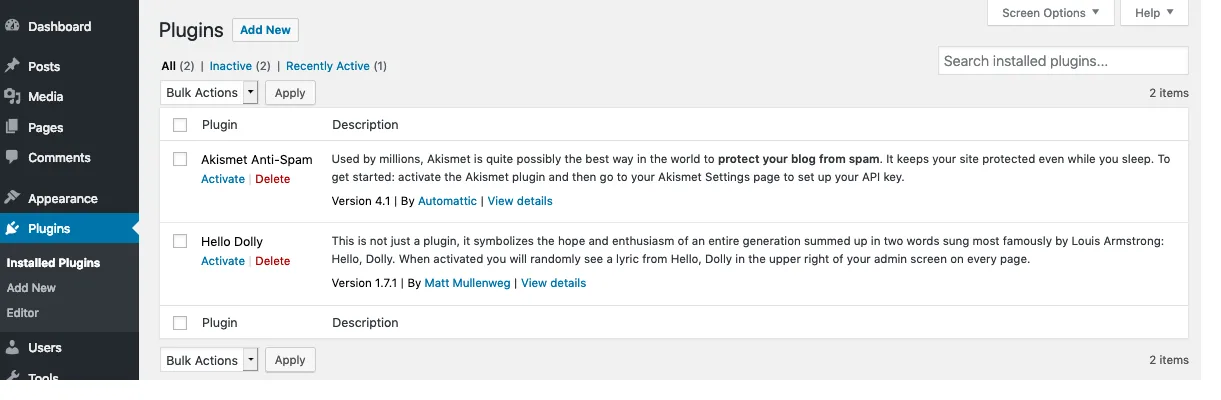
Recommended essential WordPress plugins: 6 types of plugins commonly used for B2B export websites
Essential Pages for a WordPress B2B Export Website: Besides Product Pages, These 11 Page Types Should Also Be Considered

