Contents +
What is WordPress? What is the difference between WordPress.org and WordPress.com?
Source: 创同盟
Date: 2026-10-14
Views: 112
You want to build a website and have heard that WordPress is a good choice. So you searched for "WordPress" online and found two websites: 一个叫WordPress.org and 另一个叫WordPress.com .
The names are almost identical, and they both look like official websites. Which one is the real one? What are the differences? And which one should I choose?
In fact, this is a problem that many people encounter when they first come into contact with WordPress.
This article will help you understand this. We'll avoid overly complicated technical jargon and try to explain things in the simplest way possible.
I. What exactly is WordPress?
In simple terms, WordPress is a system that can be used to build and manage websites. Its official name is Content Management System (CMS), and it is free and open source.
You can think of WordPress as a set of "website building blocks".
It provides basic functions such as articles, pages, images, and menus. You can edit content in the backend and build the website you want using different themes and plugins.
for example:
- If you want to write articles and share your life, you can use it to build a personal blog.
- If you want to showcase your company, products, and services, you can use it to build your corporate website.
- If you want overseas customers to learn about your products, you can use it to build a B2B export website.
- If you want to sell things online, you can also add e-commerce functionality through plugins such as WooCommerce.
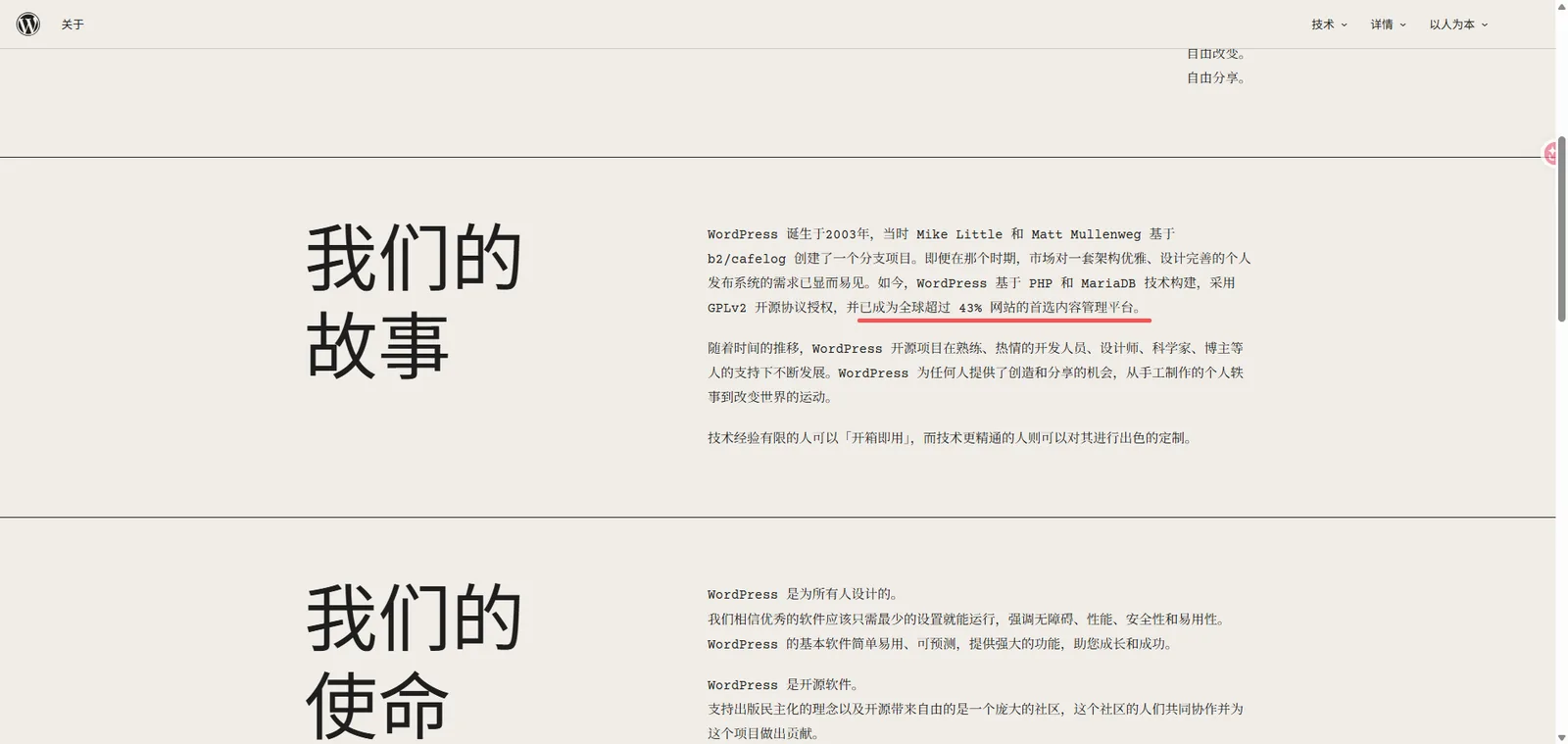
According to the official WordPress introduction, more than 43% of websites worldwide use WordPress, ranging from personal blogs to corporate websites.
However, one thing to note is that while the WordPress software itself is free, it doesn't mean building a website is completely free. If you choose to deploy your own website, you'll need to consider the domain name, server, and potentially paid themes, plugins, and development services.
II. What is the difference between WordPress.org and WordPress.com?
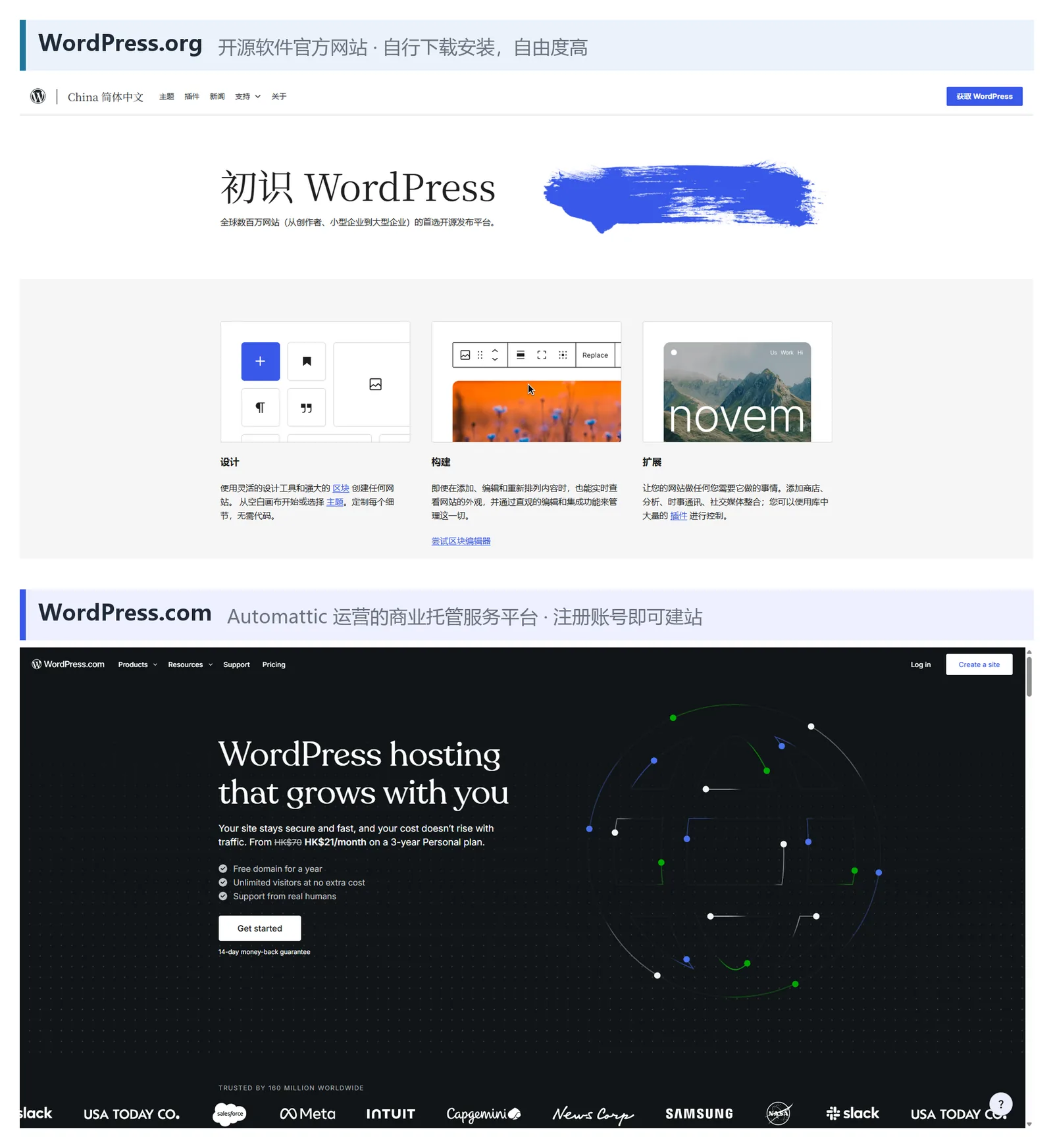
Although WordPress.org and WordPress.com have similar names, they offer different services.
1. WordPress.org : Buy your own groceries and cook your own meals.
WordPress.org is the official website for the WordPress open-source project.
You can download the WordPress software for free here and then install it on your chosen server.
For example:
WordPress.org is like an open recipe book, complete with a list of ingredients.
You can get the recipes for free, and then buy the ingredients and prepare the kitchen yourself. You can decide what dishes to make and what seasonings to use according to your own needs.
The same principle applies to WordPress.org.
You are free to choose your server, install compatible themes and plugins, and modify the code and develop features as needed.
The advantage is a high degree of freedom; you have more control over how you build and modify the website.
However, you also need to be responsible for the server, security, backup and updates, or entrust them to a professional service provider.
Official website: https://wordpress.org/
2. WordPress.com : Go directly to the restaurant to order.
WordPress.com is a website hosting service platform operated by Automattic.
It also uses WordPress technology, but you don't need to set up a server from scratch.
If WordPress.org is like buying groceries and cooking your own meals, then WordPress.com is more like a restaurant.
You simply order, and the restaurant will prepare the ingredients and cook the meal for you.
This is more convenient, but what dishes you can order and whether you can adjust the cooking method yourself depends on what services the restaurant provides.
The same applies to WordPress.com.
Once you register an account and choose a plan, you can start building your website. Website hosting and some technical maintenance are handled by the platform, but functional permissions and resource allocation will be affected by the plan rules.
It's important to note that WordPress.com isn't entirely devoid of plugin installation. According to current official rules, paid plans allow plugin installation, while free plans require an upgrade to use this feature.
Official website: https://wordpress.com/
3. What are the differences between the two?
After reviewing the examples above, you should have a general understanding. Let's compare them using a table:
@widths: 3.0,5.9,5.76
| Comparison Projects | WordPress.org (Self-hosted) | WordPress.com |
|---|---|---|
| Platform nature | Official website of open source software projects | Commercial website hosting platform |
| Software costs | WordPress software is free | There are free and paid packages. |
| server | Choose for yourself | The platform provides |
| Themes and Plugins | You can install compatible themes and plugins yourself. | Use according to package and platform rules |
| Website customization | High degree of freedom | Due to platform permission restrictions |
| Website maintenance | Self-responsibility or outsourcing to a service provider | The platform undertakes part of the maintenance. |
| Who is it suitable for? | Users who want to have independent control of the website and flexible expansion | Users who want to quickly build websites and reduce technical maintenance |
Therefore, the biggest difference between the two is not which one is better, but rather:
WordPress.org offers open-source software, giving you more choices; WordPress.com provides hosting services, making website creation and maintenance easier.
4. What is the relationship between WordPress.org and WordPress.com?
Interestingly, Matt Mullenweg, the co-founder of WordPress, is also the CEO of Automattic, the company that operates WordPress.com.
Automattic has been involved in the WordPress open-source project for a long time, providing developers and technical support. However, WordPress does not belong to Automattic alone, but is an open-source project maintained by developers and the community worldwide.
You can think of them as related brothers: they use the same WordPress technology, but one is an open-source software project and the other is a commercial hosting service, each with a different positioning.
III. What can WordPress.org offer you?
WordPress.org is not just a website for downloading software; it is also an important resource platform for the WordPress open-source project.
Here you can find the following resources.
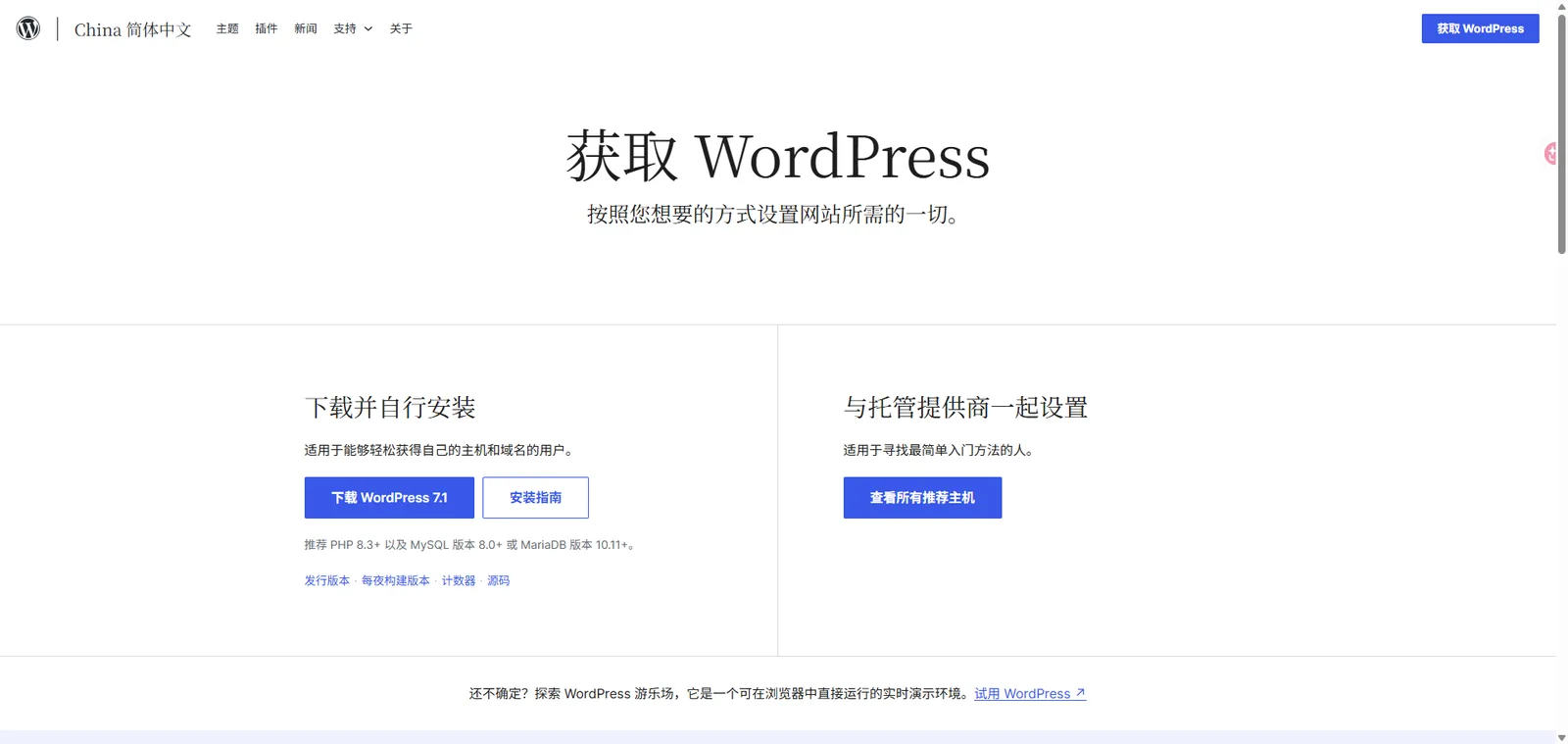
1. Download WordPress software for free
You can download the latest version of WordPress from WordPress.org and then install it on your chosen hosting service.
Many hosting providers now offer a one-click WordPress installation feature, eliminating the need to manually upload files.
Download link: https://wordpress.org/download/
2. Browse free themes
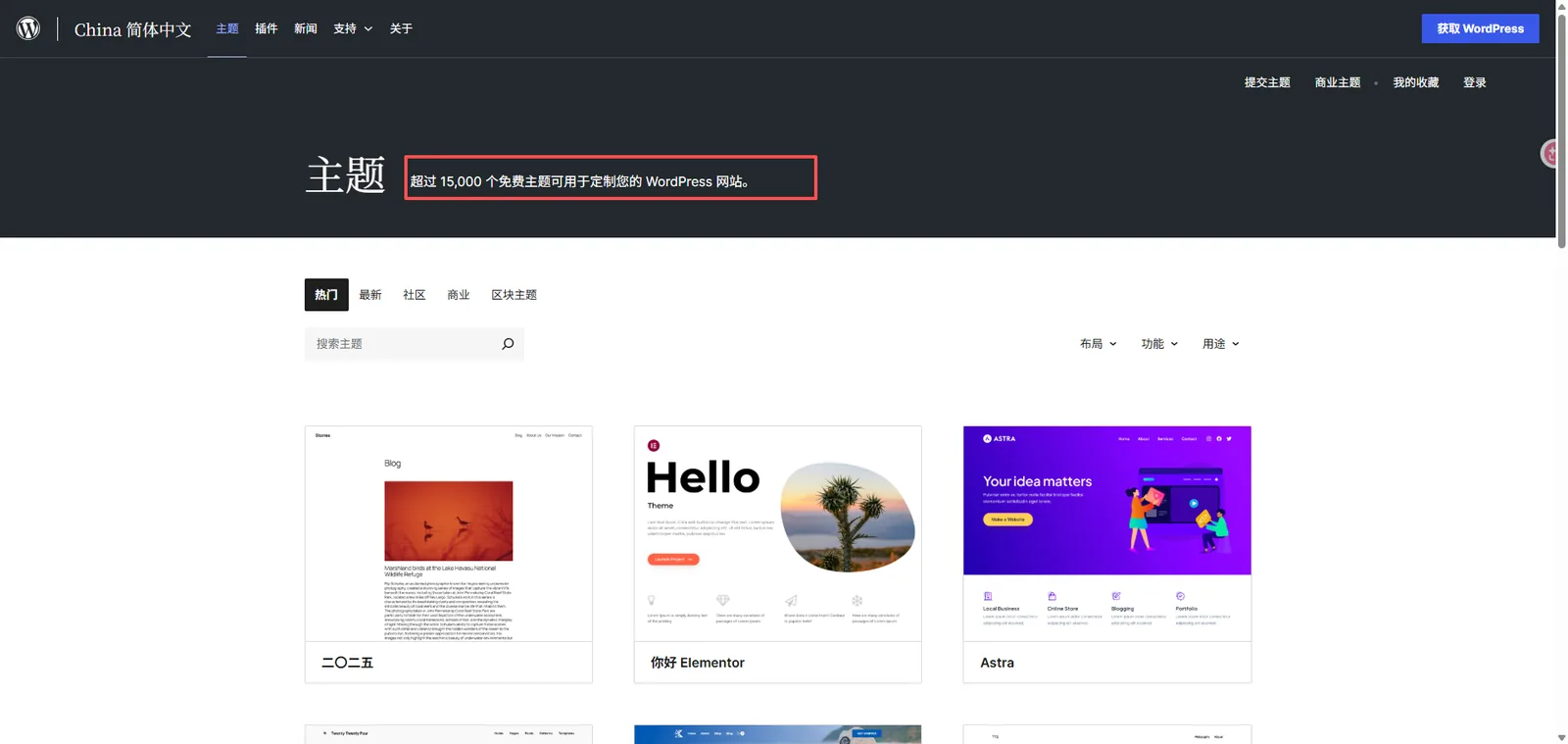
A theme can be understood as the "appearance template" of a website.
The website's colors, menu placement, and article layout can all be adjusted through the theme.
The official WordPress theme catalog offers a large number of free themes, which you can search for and install directly in your website's backend.
Of course, if higher design requirements are needed, a commercial theme or custom development can be used.
Subject Directory: https://wordpress.org/themes/
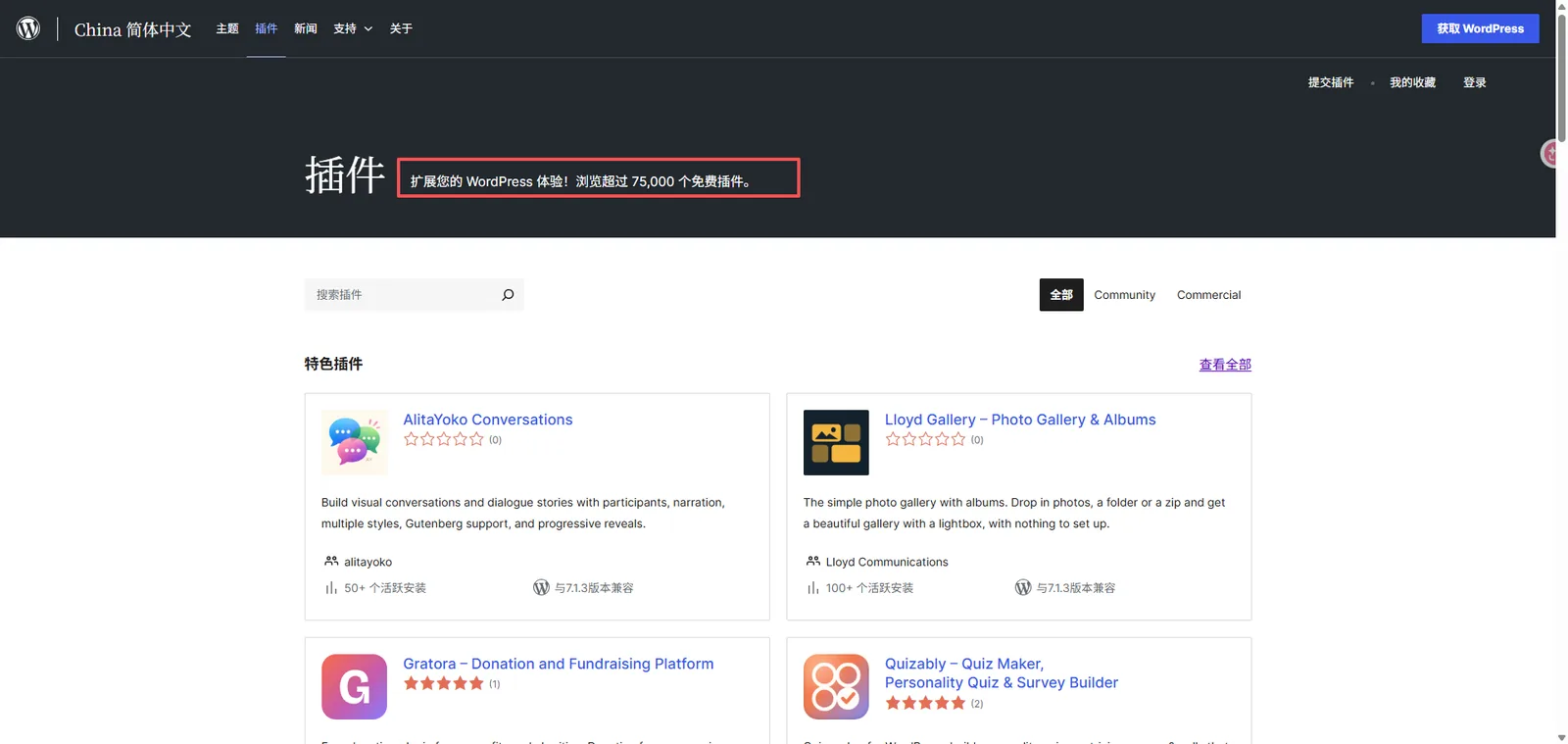
3. Install functional plugins
If the theme determines what a website looks like, then plugins determine what a website can do.
for example:
- To allow customers to submit inquiries online, you can install a contact form plugin.
- To manage SEO titles and descriptions, you can install an SEO plugin.
- If you want to back up your website regularly, you can use a backup plugin.
- To set up an online store, you can install WooCommerce.
The official WordPress plugin catalog offers a wide range of free plugins, as well as many third-party commercial plugins to choose from.
However, more plugins aren't always better. Before installing, consider whether you truly need them, and whether the plugins are safe, compatible, and continuously maintained.
Plugin Directory: https://wordpress.org/plugins/
4. Check documents and ask questions
It's normal to encounter things you don't understand when using WordPress for the first time.
For example, you can find instructions on how to install plugins, set up menus, and publish articles in the official documentation.
WordPress also has a community support forum where people can exchange experiences and ask questions.
If you have development skills, you can even participate in code improvement, interface translation, or documentation maintenance.
Official documentation: https://wordpress.org/documentation/
IV. What is "open source"? What is "self-hosting"?
说到WordPress.org , you'll often hear two words: open source and self-hosted.
It sounds a bit technical, but it's actually not hard to understand.
1. What is open source?
Simply put, open source means that the source code of software is publicly available, and people can use, view, and modify it according to the corresponding license.
WordPress is licensed under the GPL open-source license.
This means that you can use WordPress for free within the limits permitted by the license, modify the code, and even use it for commercial projects.
However, open source does not mean there are no rules at all.
For example, when modifying GPL-bound software and distributing it externally, the corresponding license requirements must be met. However, if you are only modifying and using it yourself, it does not mean that you must make all the modified code public to everyone.
For ordinary website builders, remembering one thing is enough:
Open source gives you more freedom to use and modify software, but you still need to comply with licensing rules.
2. What is self-hosting?
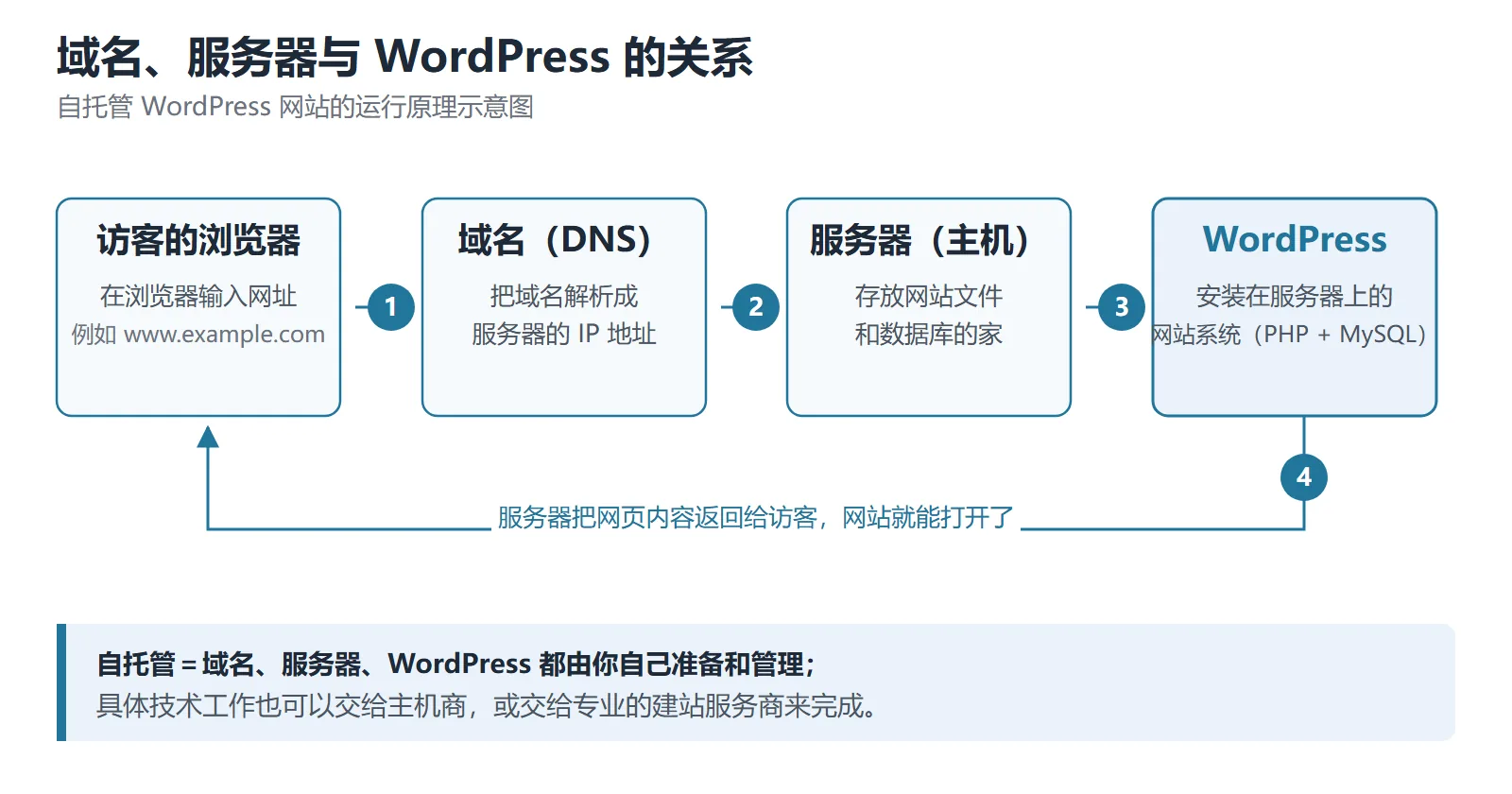
Self-hosting means that you can choose where to host your website and who will manage it.
To use a self-hosted WordPress site, you typically need to prepare the following:
Domain name: For example, `www.example.com` , this is the address where others access your website.
A server can be understood as a website's "home" on the internet, used to store website files and databases.
Operating environment: WordPress requires a suitable PHP, database, and web server environment.
Once you have all these things prepared, you can install WordPress and then configure your website.
However, after the website goes live, you will also need to be responsible for program updates, data backups, and security maintenance.
Seeing this, you might be thinking: Do I have to do all this technical work myself?
That's not necessarily true.
Many hosting providers now offer WordPress hosting or one-click installation services, or you can find a professional website building company to help you.
Therefore, self-hosting does not mean doing everything yourself, but rather that you can choose your own server and technical management methods.
5. How should I choose if I have absolutely no technical knowledge?
After saying all that, let's get back to a practical question:
I don't understand code or know how to configure a server. Which one should I choose?
Actually, there are three possible scenarios.
Scenario 1: Just want to try out WordPress
You can first register an account at WordPress.com to familiarize yourself with the basic functions of the website backend, page editing, and post publishing.
Scenario 2: I want to seriously create a website and operate it long-term.
You could consider using the open-source software provided by WordPress.org.
Choose your own domain name and hosting, install WordPress, and then build pages and add features as needed.
This approach offers greater autonomy, but it also requires careful planning for future maintenance.
Scenario 3: Lacking technical skills but desiring a high degree of autonomy over the website.
You can find a professional WordPress website building service provider.
For example, CTMON also provides WordPress website building services, which can assist in website planning, page design, function development and related technical configuration according to the needs of enterprises.
For companies that want to build a corporate website or B2B export website but are not familiar with WordPress, this method can take advantage of WordPress's flexibility and reduce the time spent learning the technology themselves.
Therefore, self-hosting WordPress does not necessarily mean that you have to do everything yourself; you can still complete website construction by choosing a suitable service provider.
6. 怎么开始使用WordPress.org ?
If you decide to use self-hosted WordPress, you can get started by following these steps.
Step 1: Purchase a domain name
First, register a domain name. You can then choose a domain registration service provider that suits your needs.
Step 2: Purchase the host
Choose a hosting service or server that supports the WordPress runtime environment. For beginners, it's advisable to prioritize hosting plans that offer one-click installation.
Step 3: Install WordPress
You can download the program from WordPress.org and install it manually, or you can complete a one-click installation through the hosting control panel.
Step 4: Complete basic settings
Configure the website name, administrator account, database, and other information, and set up basic security settings.
Step 5: Install themes and plugins
Choose a theme based on the website's purpose, and then install functional plugins as needed.
Step 6: Create pages and check the website
Start adding pages such as Homepage, About Us, and Contact Us. Before going live, check that the website is accessible, displays correctly on mobile devices, supports HTTPS, and that navigation links and contact forms are working properly.
In this way, a basic WordPress website can be started.
Of course, if it is a corporate website or a B2B export website, further efforts are needed in website planning, page design, content creation, and post-maintenance.
VII. Frequently Asked Questions about WordPress
1. Is WordPress really free?
WordPress is a free open-source software, but self-hosting a website typically requires paying for a domain name and server. Using commercial themes, paid plugins, or professional development services may also incur additional costs.
2. Can I use WordPress if I don't know how to code?
Yes. WordPress offers visual editing and backend management features, so you don't necessarily need coding knowledge to publish articles or modify page content.
However, if complex functions or special designs are required, the involvement of technical professionals is usually necessary.
3. Can WordPress.org and WordPress.com be migrated to each other?
Migration is possible under certain conditions.
For example, you can export content from WordPress.com and then import it into your self-hosted WordPress website. Conversely, there are also migration methods available.
However, content migration does not mean that all page designs, plugin functions, and website configurations can be automatically and completely migrated. It depends on which functions the original website used.
VIII. Summary: How to choose between WordPress.org and WordPress.com?
In short:
- WordPress.org is the official website for the WordPress open-source software. You can download the software for free and choose your own server, theme, and plugins, giving you a high degree of autonomy, but you need to arrange website maintenance yourself.
- WordPress.com is a commercial hosting service platform that can reduce some technical configuration and maintenance work, but related functions are subject to the limitations of the package and platform rules.
If you just want to experience WordPress, you can start with WordPress.com.
If you want to operate your website long-term and flexibly design and expand its functionality according to your needs, you can learn more about self-hosted WordPress.
If you are planning to build a corporate website or a B2B export website but do not want to handle the technical issues yourself, you can also choose a professional website building service provider.
CTMON offers WordPress website building services , assisting businesses in planning website structure, page design, and feature configuration based on their brand presentation, product introduction, and business needs. For export businesses, SEO infrastructure and customer inquiry paths can be considered during the website building phase, laying a solid foundation for subsequent promotion and operation.
If you have any WordPress business website building needs, you are welcome to contact CTMON to discuss specific solutions.
Author: CTMON | B2B Digital Marketing Service Provider
References
- WordPress official website: https://wordpress.org/
- Official differences between WordPress.org and WordPress.com: https://wordpress.org/documentation/article/difference-between-wordpress-org-and-wordpress-com/
- WordPress official theme directory: https://wordpress.org/themes/
- WordPress official plugin directory: https://wordpress.org/plugins/
- WordPress Open Source License: https://wordpress.org/about/license/
- WordPress.com Official Feature Description: https://wordpress.com/support/plugins/install-a-plugin/

What does international social media management service include? 2026 Guide to Social Media Management for Export Businesses
2026-10-28

How to write a WordPress product page that will make overseas buyers want to send inquiries?
2026-10-28

How to fix WordPress form emails not sending: Practical WP Mail SMTP configuration
2026-10-27

Are foreign trade promotion companies reliable? Six key criteria for businesses to judge promotion service providers in 2026.
2026-10-26

How do I set up an email account for export businesses? How can I configure it to avoid it ending up in the spam/junk mail folder?
2026-10-26
Related Articles
How to configure WPForms contact forms: Which should I choose, WPForms or Contact Form 7?
How to write a WordPress product page that will make overseas buyers want to send inquiries?
How to fix WordPress form emails not sending: Practical WP Mail SMTP configuration
How do I set up an email account for export businesses? How can I configure it to avoid it ending up in the spam/junk mail folder?
Recommended essential WordPress plugins: 6 types of plugins commonly used for B2B export websites

