Contents +
Top 5 SEO Speed Optimization Tools for Business Websites
Source: 创同盟
Date: 2026-06-09
Views: 504
The core purpose of SEO speed optimization for business websites is to improve page loading efficiency, interactive smoothness, and visual stability, allowing users to see content faster and complete operations smoothly, while enabling search engines to better understand and evaluate the page experience. Its significance lies in the fact that it not only enhances a website's competitiveness in search results but also reduces bounce rate, increases user trust and conversion rates, providing long-term support for the growth of organic traffic and monetization of business websites.
Google also provides tools like PageSpeed Insights and Lighthouse to help business website developers analyze and optimize page loading speeds across various devices. By leveraging Google's infrastructure and adhering to relevant performance rules, developers can significantly improve page performance. This illustrates the importance of page loading speed in Google's algorithm system, helping business website operators identify optimization bottlenecks and resolve marketing and user experience issues.
The following is an explanation of tools for optimizing business website page speed, which can serve as a reference for everyone during the site optimization process, showing the functions and usage procedures of the tools.
1、PageSpeed Insights
PageSpeed Insights (PSI) is Google's web performance testing tool used to analyze a page's speed performance on mobile and desktop devices and provide actionable optimization suggestions. It displays two types of data simultaneously: Field Data (real user data): from Chrome UX Report, reflecting the experience of real users over the past 28 days; and Lab Data (laboratory data): from Lighthouse, suitable for locating and troubleshooting specific performance issues. The following example illustrates its application.
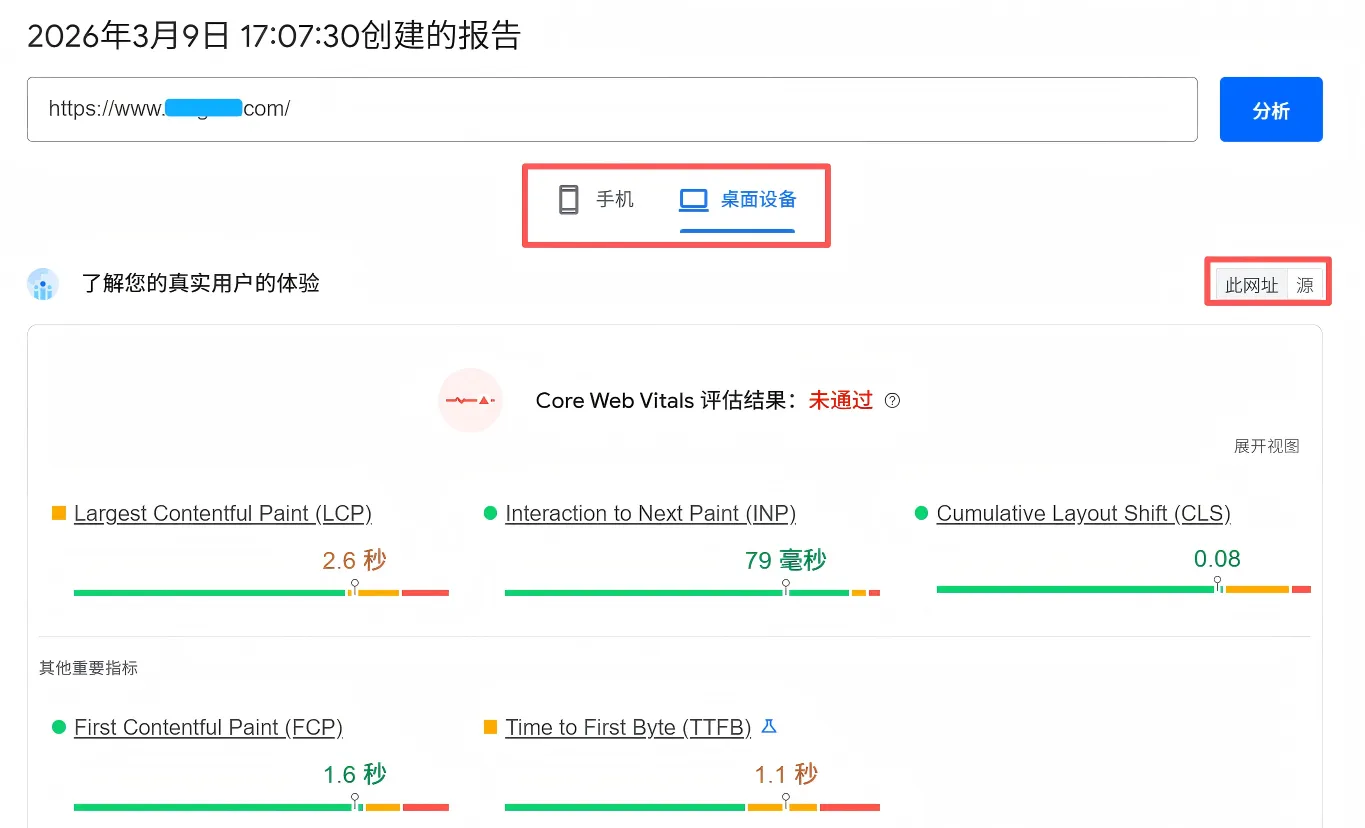
Google now emphasizes the "overall page experience," with Core Web Vitals being an important part, but not the only factor. HTTPS, mobile experience, and intrusive pop-ups also affect page performance. Google explicitly considers Core Web Vitals a key indicator of page experience, with key metrics being LCP, INP, and CLS. Official recommendations are roughly: LCP ≤ 2.5 seconds, INP < ≤ 200 milliseconds, and CLS ≤ 0.1. For business websites doing SEO, speed optimization isn't just about achieving high scores, but about improving crawling efficiency, user experience, and conversion rates.
a. LCP (Maximum Content Rendering)
The time it takes for users to see the main content typically includes the first screen image, the main title area, and the banner. Google recommends within 2.5 seconds.
b. INP (Interactive Response)
This determines whether a page will "lag" after being clicked. Google now uses INP to evaluate interaction performance, with a target time of less than 200ms.
c. CLS (Layout Offset)
Buttons, images, and text jumping around during page loading can negatively impact user experience and conversion rates; the target is to reduce this by no more than 0.1%.
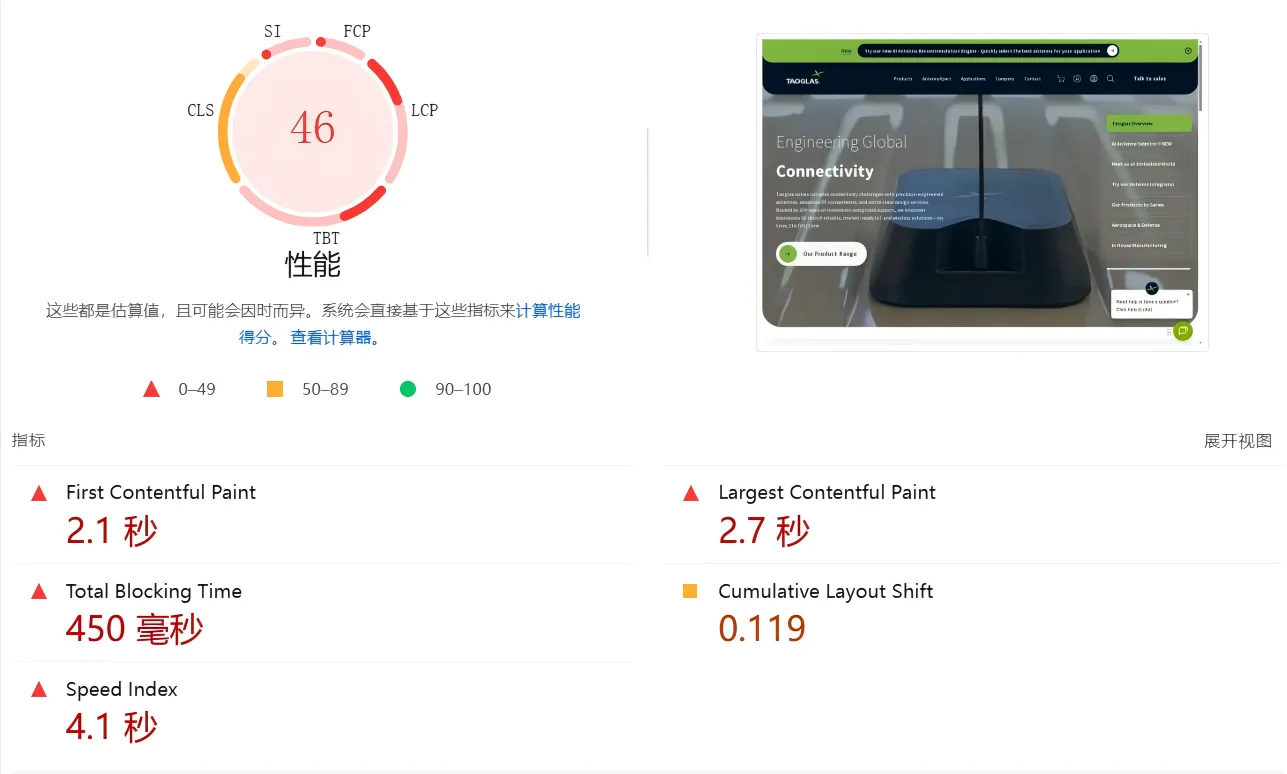
The most common problem for business websites is an excessively large homepage banner. You should prioritize optimizing your homepage banner, category header images, and product main images: convert them to WebP/AVIF, control the actual display size of the banner images, avoid uploading excessively large original images, and give the main banner image a higher loading priority. Lazy loading of non-banner images is often slowed down by the resources on the homepage. web.dev also emphasizes that optimizing LCP requires addressing the entire resource loading chain. The report below provides targeted suggestions for each area that needs optimization.
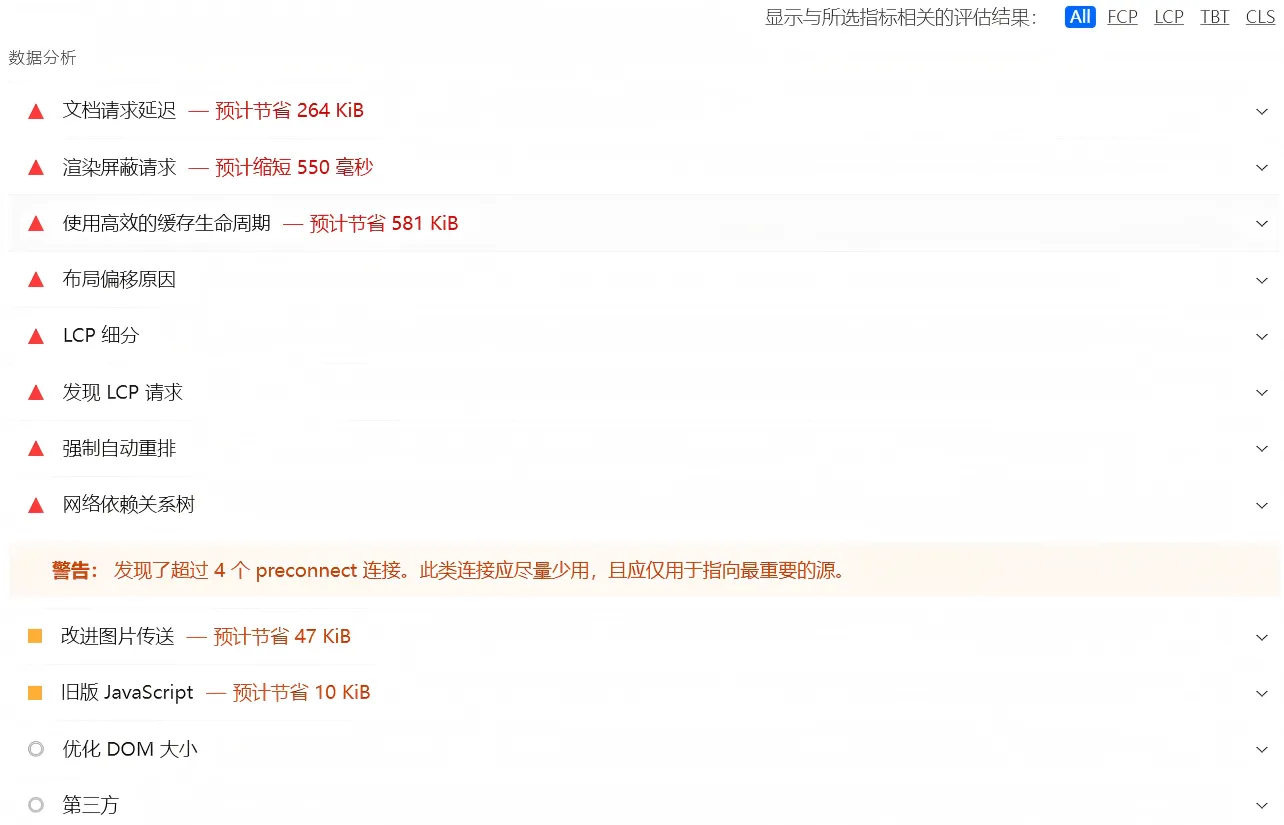
Access link: https://pagespeed.web.dev/
2. Lighthouse (browser plugin)
Lighthouse helps you improve the quality of your web pages. You can run the script on any webpage. The tool evaluates performance, accessibility, search engine optimization (SEO), and more. Click to generate a report. Lighthouse will run an audit on the currently focused webpage and then open a new tab containing the results report.
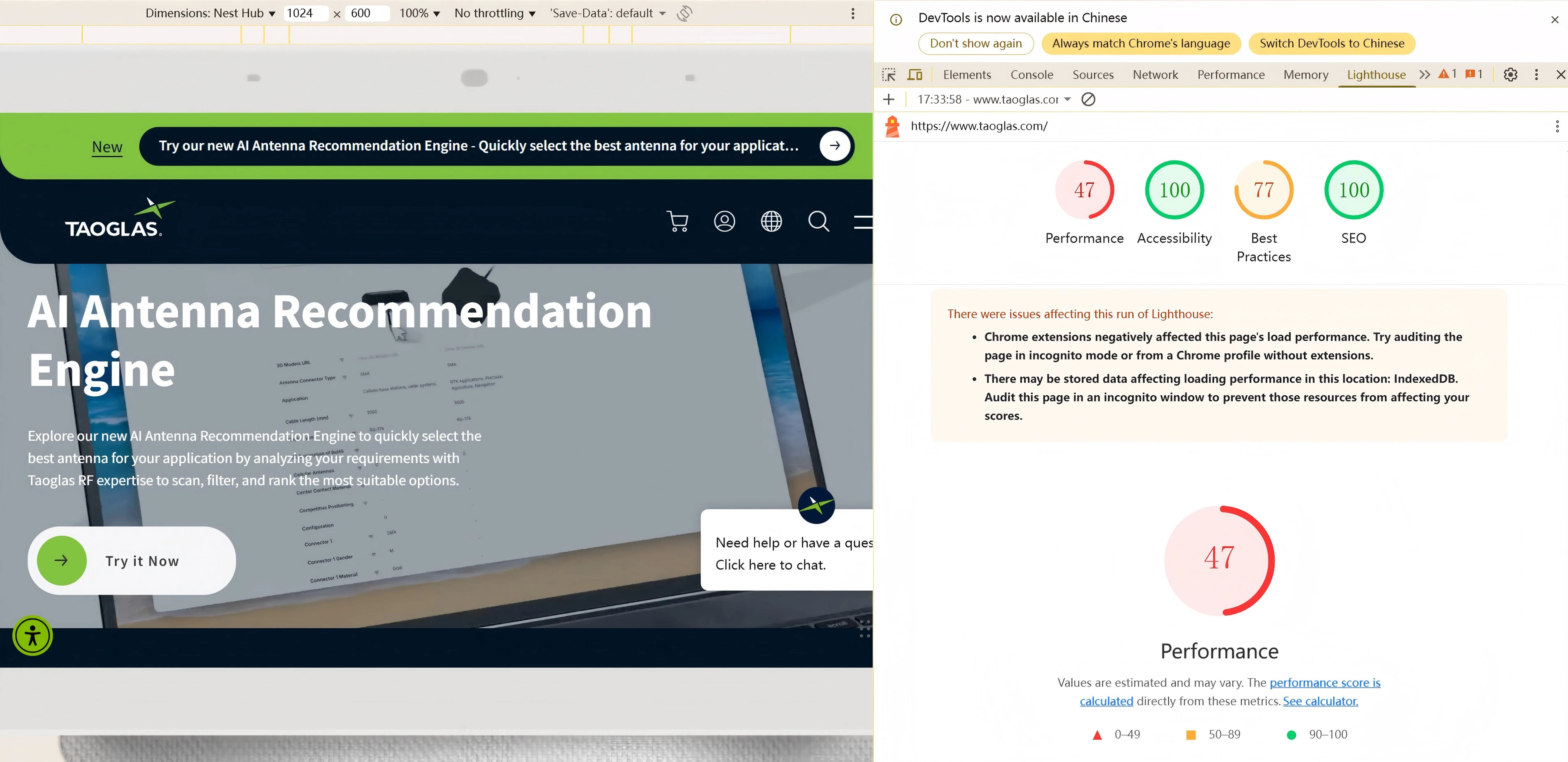
Access link: https://developer.chrome.com/docs/lighthouse/overview
3、GTmetrix
GTmetrix is a website performance testing tool for business websites, primarily used to analyze page load speed, user experience metrics, and front-end performance issues. It outputs core website performance data, such as first-screen loading time, maximum content rendering, page stability, and blocking time. Through a waterfall layout, page loading process analysis, and detailed suggestions, it helps operations or development teams quickly identify specific reasons slowing down the website, such as excessively large images, too many scripts, improper caching configuration, or interference from third-party code.
In addition to single speed tests, GTmetrix supports multi-region, multi-device environment testing, as well as historical report comparison, scheduled monitoring, and anomaly alerts, making it suitable for continuously tracking performance changes of business websites. For cross-border e-commerce, brand websites, and marketing landing pages, its value lies not only in showing "how fast the website is," but also "why it's slow, how to optimize it, and whether the optimization has improved the situation." Therefore, it is a commonly used auxiliary tool in business website performance optimization and technical SEO.
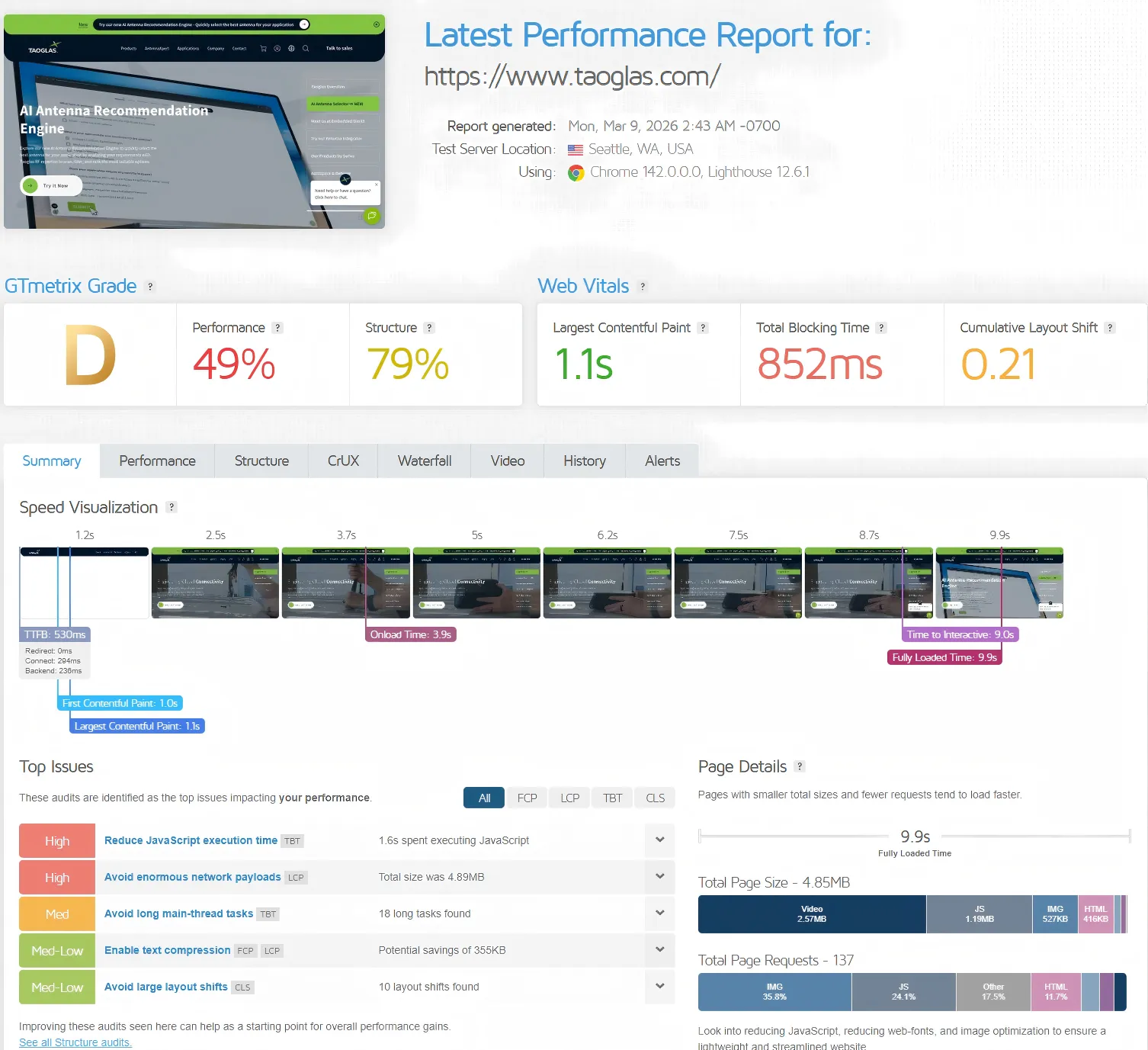
Access link: https://gtmetrix.com/
4. DebugBear detection tool
DebugBear is a website performance testing tool geared towards professional operational and technical troubleshooting. It's suitable for business websites to check page load speed, Core Web Vitals (such as LCP, CLS, INP), first-screen rendering process, and the performance impact of images, JS, and third-party scripts. It doesn't just provide a score; it also helps you see exactly where your website is slow through waterfall charts, loading processes, and historical trends. It's especially suitable for Shopify, WordPress, and cross-border e-commerce business websites.
Its biggest difference from other common tools is that DebugBear emphasizes "continuous monitoring" and "long-term optimization," rather than just a single speed test. Tools like PageSpeed Insights are better suited for quickly viewing scores and basic optimization suggestions for free; GTmetrix is better for viewing waterfall charts and loading details for individual pages; and WebPageTest is more flexible and technically oriented, suitable for advanced testing scenarios. In contrast, DebugBear integrates single-test capabilities, historical trends, alert notifications, and Real User Monitoring (RUM).
If you only occasionally check website speed, the first few free tools are sufficient; however, if you want to monitor business website performance changes over the long term, identify speed regressions caused by plugins, ad scripts, and theme redesigns, and continuously optimize the conversion experience, DebugBear will have a greater advantage.
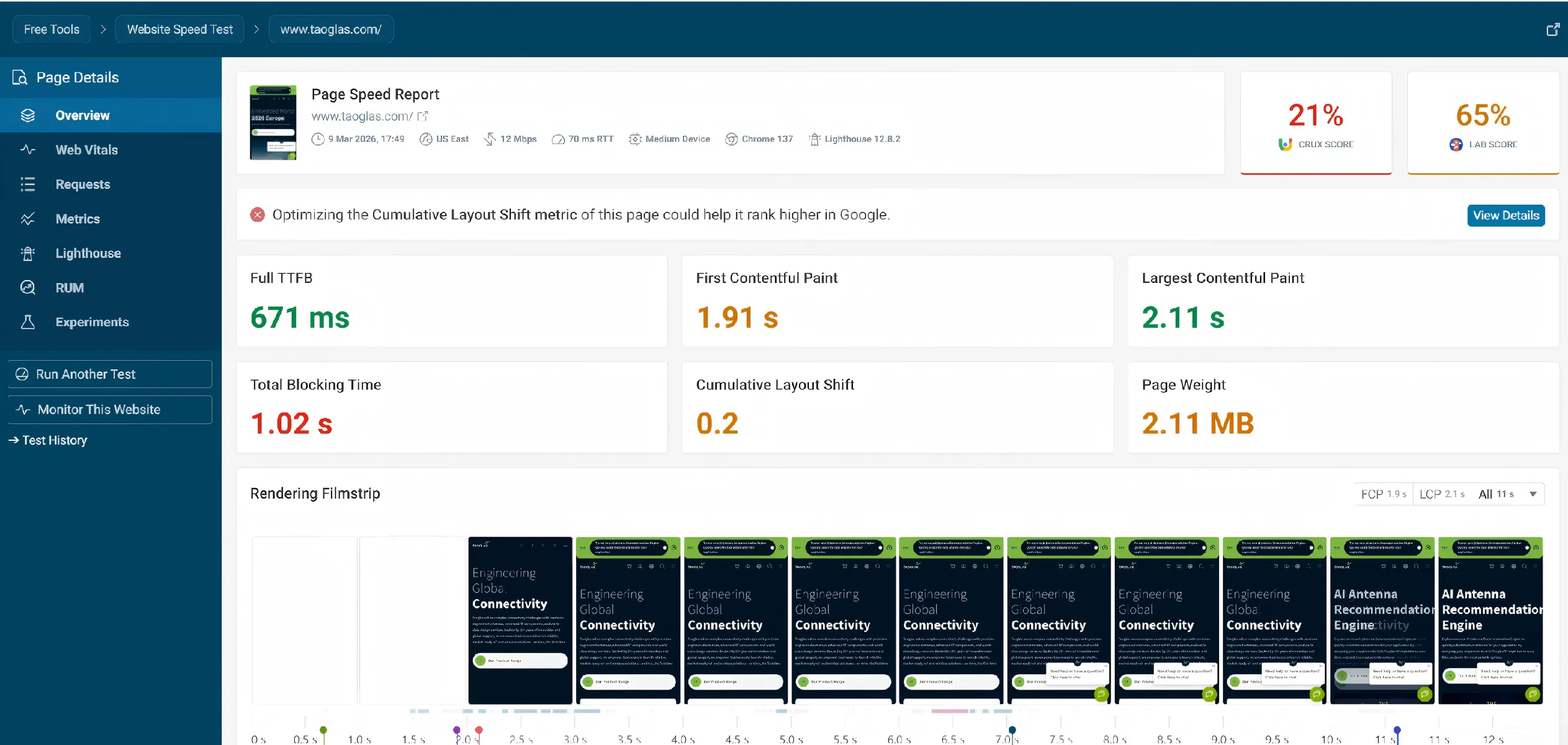
Access link: https://www.debugbear.com/
5、EXPERTE
EXPERTE is a comprehensive tool for website diagnosis and optimization, primarily used to assess a website's security, performance, and basic configuration. It can check for malware, blacklist risks, SSL certificates, HTTP security headers, DNS records, and security-related settings such as SPF, DMARC, and DNSSEC, helping users quickly identify security and technical configuration issues on their websites.
In addition, EXPERTE also supports testing functions such as website speed, Core Web Vitals, mobile adaptation, page experience, accessibility, content readability, and technology stack identification, enabling a comprehensive assessment of a website from multiple perspectives, including user experience, SEO optimization, and technical analysis.
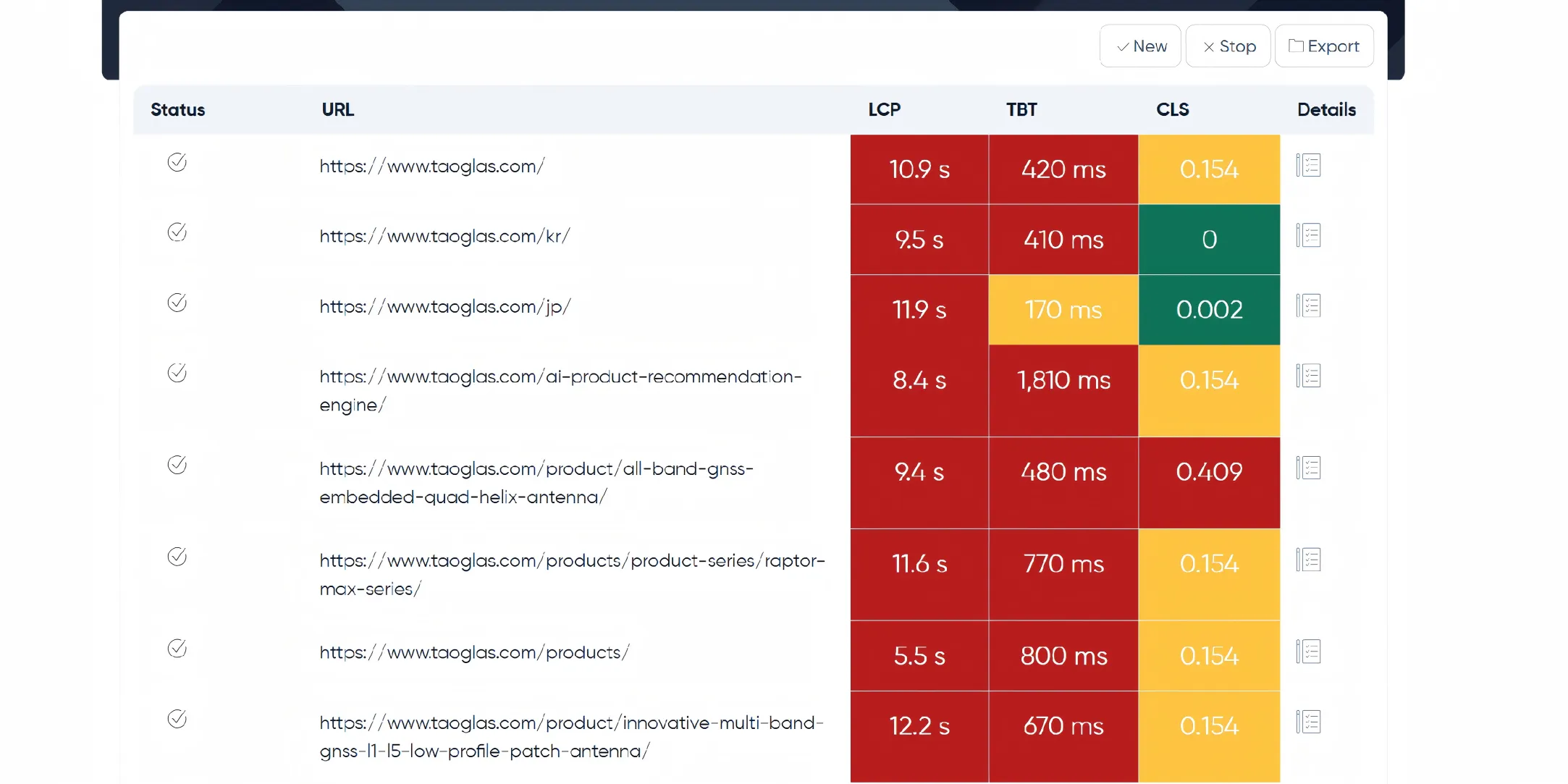
Access link: https://www.experte.com/
To learn more about different business website tools and how to use them, please browse our previous articles to get the latest business website application tools. Whether you are an SEO beginner or a seasoned strategist, these tools cover all the core functions: keyword research, technical auditing, link building, performance tracking, and more. From Google's free webmaster resources to open-source crawlers and browser extensions, each tool we've carefully selected is efficient, reliable, and valuable. Contact us for more resource packs.

What does international social media management service include? 2026 Guide to Social Media Management for Export Businesses
2026-10-28

How to write a WordPress product page that will make overseas buyers want to send inquiries?
2026-10-28

How to fix WordPress form emails not sending: Practical WP Mail SMTP configuration
2026-10-27

Are foreign trade promotion companies reliable? Six key criteria for businesses to judge promotion service providers in 2026.
2026-10-26

How do I set up an email account for export businesses? How can I configure it to avoid it ending up in the spam/junk mail folder?
2026-10-26
Related Articles
What are the differences between Google SEO and Google Ads? Which should B2B export businesses do first?
2026 Shenzhen Google SEO Optimization Company Recommendations: Service Provider Comparison and Selection Guide
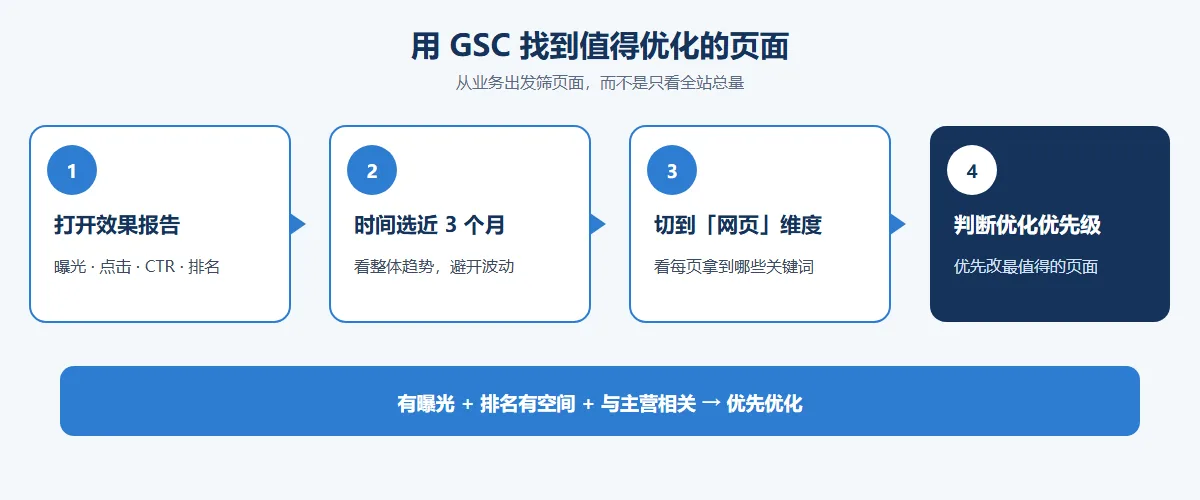
How to improve Google rankings through SEO optimization for international trade? 7 practical methods and steps.

Recommended Shenzhen B2B export website operation company: How to choose a suitable international lead generation service provider for your enterprise?

Why is the Google ranking of Shenzhen export businesses' business websites not improving?

